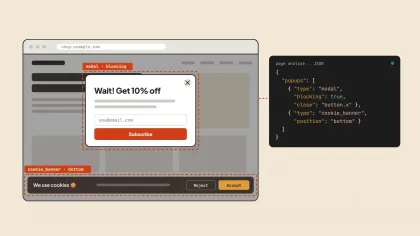
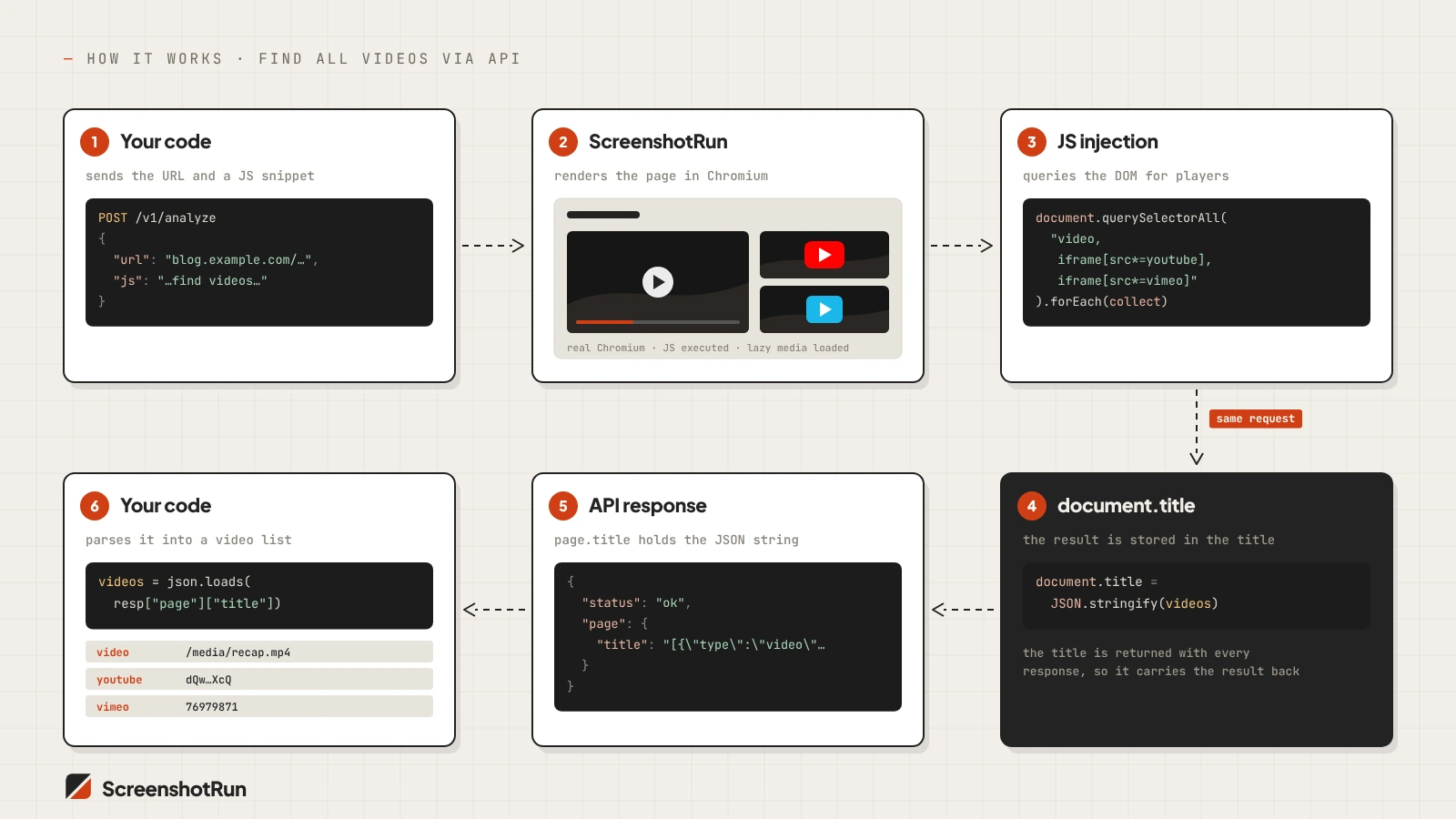
The Page Analysis API extracts every element on a rendered page as structured JSON. Videos aren't a built-in category yet, but you can find all videos on a webpage via API with one trick: inject a short JavaScript snippet through the js parameter that queries the DOM for <video> tags, YouTube iframes, Vimeo iframes, embedded players from other platforms. The API renders the page in Chromium first, so JavaScript-injected players that don't exist in the raw HTML show up too.
ScreenshotRun handles the browser and the rendering. It runs your JavaScript inside the page. Your code gets back a list of every video — source URLs, dimensions, player type, position on screen. No scraping, no headless browser setup on your end.
Why find videos on a webpage programmatically?
Content auditors need video inventories. A marketing team publishes 200 blog posts over two years, each with one or two embedded YouTube videos. Some of those videos get deleted or made private. The embed stays in the HTML, but the player shows a black rectangle with "Video unavailable." Scanning every page for video embeds and checking their status catches these dead embeds before visitors do.
SEO teams care about video for a different reason. Google's Video indexing report in Search Console tracks which pages have valid video markup. Pages with working <video> elements or properly embedded YouTube players can appear in Video search results and get rich snippets. But only if the video is actually visible in the viewport. A video buried below three screen-lengths of text might not qualify. Extracting video positions with pixel coordinates answers that question directly.
How many product demo videos does a competitor use on their landing pages? Where do they place them relative to the fold? Which hosting platform do they favor — YouTube, Vimeo, self-hosted, or something custom? Do they autoplay or require a click? These patterns inform your own video strategy. Scanning ten competitor homepages takes seconds with the API.
Accessibility is another reason to scan. Every <video> element should have captions (<track kind="captions">). Iframes embedding YouTube should include a title attribute for screen readers. Finding all videos first is the prerequisite to checking whether they meet WCAG 1.2 requirements.
How to find all videos on a webpage with the API
The approach: send the URL to the analyze endpoint with a JavaScript injection that finds all video-related elements. The API renders the page, runs your JS, then returns the standard page analysis. Your injected code stores its findings on window, and a second lightweight call (or the same response's interactive elements) gives you the data.
A cleaner pattern uses the analyze endpoint purely for rendering and JS execution, then extracts video data through the injected script:
import requests
import json
API_KEY = "YOUR_API_KEY"
VIDEO_DETECTION_JS = """
(() => {
const rect = el => {
const r = el.getBoundingClientRect();
return [Math.round(r.x), Math.round(r.y), Math.round(r.width), Math.round(r.height)];
};
const videos = [];
// Native Running this against ted.com/talks produces output like this:
Found 8 videos
  [native] https://pa.tedcdn.com/homepage-hero.mp4
    Position: [0, 0, 1280, 720]
  [youtube] https://www.youtube.com/embed/dQw4w9WgXcQ
    Position: [160, 840, 560, 315]
  [youtube] https://www.youtube.com/embed/8jPQjjsBbIc
    Position: [160, 1290, 560, 315]
  [youtube] https://www.youtube.com/embed/UF8uR6Z6KLc
    Position: [160, 1740, 560, 315]
  [youtube] https://www.youtube.com/embed/arj7oStGLkU
    Position: [720, 840, 560, 315]
  [youtube] https://www.youtube.com/embed/PLjMaVGiODY
    Position: [720, 1290, 560, 315]
  [youtube] https://www.youtube.com/embed/RcYjXbSJBN8
    Position: [720, 1740, 560, 315]
  [native] blob:https://www.ted.com/a3f4b2c1-9d8e-4f5a-b6c7-d8e9f0a1b2c3
    Position: [40, 2200, 400, 225]
The first native video is the hero background — full-width, autoplaying, muted. Six YouTube embeds sit in a two-column grid below it. The last native video uses a blob URL, which means TED's player loaded it through JavaScript rather than a direct file link. All eight show up because the API rendered the page and ran your JS against the live DOM.
The raw data behind that output is a JSON object stored in document.title. Here's what a single entry looks like:
{
  "video_count": 8,
  "videos": [
    {
      "type": "native",
      "src": "https://pa.tedcdn.com/homepage-hero.mp4",
      "poster": "https://pa.tedcdn.com/homepage-hero-poster.jpg",
      "autoplay": true,
      "muted": true,
      "controls": false,
      "duration": 32.4,
      "has_captions": false,
      "rect": [0, 0, 1280, 720]
    },
    {
      "type": "youtube",
      "src": "https://www.youtube.com/embed/8jPQjjsBbIc",
      "video_id": "8jPQjjsBbIc",
      "title": "The next satisfying satisfying video",
      "rect": [160, 1290, 560, 315]
    }
  ]
}
Each video carries its type, source URL, bounding rectangle in pixels, and type-specific metadata. Native videos report autoplay/muted/controls flags and caption track presence. YouTube entries include the extracted video ID you can pass to the oEmbed endpoint for status checks. The rect array is [x, y, width, height] relative to the page top-left corner — useful for fold detection and layout analysis.
The JS injection runs after the page loads and all JavaScript executes. It queries the fully rendered DOM — not the raw HTML source. React apps that inject YouTube players on mount, lazy-loaded Vimeo embeds triggered by scroll, Wistia players that initialize from a div class, Vidyard lightboxes that load asynchronously — the rendered DOM catches all of them.
We store the results in document.title because that field always comes back in the analyze response's page object. No need for a second API call.

What the detection script catches
The script targets several categories of video content, each with different DOM patterns.
Native HTML5 video uses the <video> tag with a src attribute or nested <source> elements. Self-hosted MP4 files, HLS streams served through video.js, background loops on landing pages, even WebM fallbacks. The script also checks for caption tracks — useful for accessibility audits.
YouTube embeds use iframes with src containing youtube.com/embed/ or the short youtu.be format. The script extracts the 11-character video ID, which you can use to check the video's status via the YouTube Data API.
Vimeo embeds follow the same iframe pattern with player.vimeo.com/video/ in the source URL. Wistia works differently — it often uses a <div class="wistia_embed"> that initializes via their JavaScript SDK, though some integrations use iframes. Loom embeds are always iframes with loom.com/embed/ in the source.
The catch-all at the end picks up less common platforms. Vidyard, Brightcove, JW Player, Cloudflare Stream — if the iframe URL contains "video", "player", "embed", or "media", it gets flagged. You won't know the exact platform from the URL alone, but you'll know something video-related is there.
Checking for dead or unavailable videos
Finding videos is the first part. Are they still working? A YouTube embed with a deleted video still exists in the DOM. The iframe loads, but it shows an error message instead of a player. You can verify video status by checking the source URLs:
def check_youtube_status(video_id):
    """Check if a YouTube video is still accessible."""
    try:
        # YouTube oEmbed endpoint - no API key needed
        resp = requests.get(
            f"https://www.youtube.com/oembed?url=https://youtube.com/watch?v={video_id}&format=json",
            timeout=10,
        )
        if resp.status_code == 200:
            data = resp.json()
            return {"status": "live", "title": data.get("title", "")}
        return {"status": "unavailable"}
    except Exception:
        return {"status": "error"}


def check_vimeo_status(video_id):
    """Check if a Vimeo video is still accessible."""
    try:
        resp = requests.get(
            f"https://vimeo.com/api/oembed.json?url=https://vimeo.com/{video_id}",
            timeout=10,
        )
        if resp.status_code == 200:
            data = resp.json()
            return {"status": "live", "title": data.get("title", "")}
        return {"status": "unavailable"}
    except Exception:
        return {"status": "error"}


# After finding videos, check their status
result = find_videos("https://example.com/blog-post-with-videos")
for v in result["videos"]:
    if v["type"] == "youtube" and v.get("video_id"):
        status = check_youtube_status(v["video_id"])
        print(f"  YouTube {v['video_id']}: {status['status']}")
    elif v["type"] == "vimeo" and v.get("video_id"):
        status = check_vimeo_status(v["video_id"])
        print(f"  Vimeo {v['video_id']}: {status['status']}")
The oEmbed endpoints don't require API keys. They return 200 for public videos and 401/404 for private or deleted ones. For a full site audit, combine video detection with status checking across every page and you'll have a complete inventory of broken video embeds.
Scanning multiple pages for video content
The payoff scales with page count. Parse a sitemap, feed the URLs through the detection script, build a spreadsheet of every video across the entire site.
import csv

urls = [
    "https://example.com",
    "https://example.com/about",
    "https://example.com/blog/product-demo",
    "https://example.com/blog/customer-story",
    "https://example.com/pricing",
    "https://example.com/features",
]

all_videos = []
for url in urls:
    try:
        result = find_videos(url)
        for v in result["videos"]:
            all_videos.append({
                "page_url": url,
                "type": v["type"],
                "video_src": v.get("src", "")[:200],
                "video_id": v.get("video_id", ""),
                "title": v.get("title", ""),
                "position_x": v["rect"][0] if v.get("rect") else "",
                "position_y": v["rect"][1] if v.get("rect") else "",
                "width": v["rect"][2] if v.get("rect") else "",
                "height": v["rect"][3] if v.get("rect") else "",
            })
        if not result["videos"]:
            all_videos.append({"page_url": url, "type": "none"})
    except Exception as e:
        all_videos.append({"page_url": url, "type": "error", "title": str(e)})

# Export to CSV
with open("video-audit.csv", "w", newline="") as f:
    fields = ["page_url", "type", "video_src", "video_id",
              "title", "position_x", "position_y", "width", "height"]
    writer = csv.DictWriter(f, fieldnames=fields, extrasaction="ignore")
    writer.writeheader()
    writer.writerows(all_videos)

video_pages = sum(1 for url in set(v["page_url"] for v in all_videos if v["type"] != "none"))
total_vids = sum(1 for v in all_videos if v["type"] not in ("none", "error"))
print(f"Scanned {len(urls)} pages: {video_pages} have videos, {total_vids} total videos found")
Six pages finish in under twenty seconds. The CSV gives you a complete video map: which pages have videos, what platform they're on, their pixel positions, their source URLs. Hand that to a content manager and they can spot dead embeds, missing captions, inconsistent player choices, stale thumbnails — all without opening a single browser tab.
Above-the-fold video detection
Google's video rich results require the video to be "prominent" on the page. A video at [640, 200, 560, 315] sits above the fold on a 1280x800 viewport. That's prominent. A video at [100, 2400, 560, 315] is buried below two and a half screen-lengths of content. Probably not getting that rich snippet.
Filter the results by position:
VIEWPORT_HEIGHT = 800

def is_above_fold(video, viewport_height=VIEWPORT_HEIGHT):
    """Check if a video is at least partially visible above the fold."""
    rect = video.get("rect")
    if not rect or len(rect) < 4:
        return False
    y = rect[1]
    height = rect[3]
    # Video top edge is within the viewport
    return y < viewport_height and height > 50

result = find_videos("https://example.com/landing-page")
for v in result["videos"]:
    fold = "ABOVE fold" if is_above_fold(v) else "below fold"
    print(f"  [{v['type']}] y={v['rect'][1]}px — {fold}")
Run this across your sitemap and flag every page where the primary video is below the fold. Quick win for SEO teams — move the video up, get the rich snippet.
Detecting background and autoplay videos
Not all videos are content. Landing pages use background videos for visual flair — muted, autoplaying, looping. These eat bandwidth and hurt Core Web Vitals (especially LCP on mobile) without adding content value. The detection script flags autoplay and muted attributes on native video elements:
result = find_videos("https://example.com")
for v in result["videos"]:
    if v["type"] == "native":
        flags = []
        if v.get("autoplay"):
            flags.append("autoplay")
        if v.get("muted"):
            flags.append("muted")
        if not v.get("controls"):
            flags.append("no-controls")

        if flags:
            print(f"  Background video detected: {', '.join(flags)}")
            print(f"    Source: {v.get('src', 'unknown')[:100]}")
            print(f"    Size: {v['rect'][2]}x{v['rect'][3]}px")
A video that's autoplay + muted + no-controls is almost certainly decorative. If it's also large (covering 50%+ of the viewport), that's a performance concern worth flagging. Some of these ship as 20MB MP4 files that tank mobile page load times.
Accessibility audit: checking for captions
WCAG 2.1 success criterion 1.2.2 requires captions for all prerecorded audio content in synchronized media. In practice, that means every <video> with spoken audio should have a <track kind="captions"> element. YouTube and Vimeo handle captions on their platform, but self-hosted videos need them added manually.
result = find_videos("https://example.com")
for v in result["videos"]:
    if v["type"] == "native" and not v.get("has_captions"):
        print(f"  Missing captions: {v.get('src', 'unknown')[:80]}")
        print(f"    Page position: y={v['rect'][1]}px")
Combine this with the batch scanner from earlier and you get a site-wide accessibility report for video captions. Every native <video> without a caption track gets flagged with its page URL and position.
The full workflow
Video detection on the web comes down to querying the rendered DOM for the right elements. The Page Analysis API handles the heavy part — launching a browser, rendering JavaScript, executing your injected code, waiting for lazy-loaded content to settle. The JS injection parameter lets you run custom extraction logic inside that rendered page. Stealth mode keeps the browser looking like a real Chrome session so video players load normally. Your application code classifies the results and builds the report.
The same pattern works for other media types too. Swap the selectors and you're detecting audio players, embedded podcasts, PDF viewers, interactive maps. The API doesn't need a dedicated category for every element type when you can query the DOM directly. That's the point.