ScreenshotRun captures Shopify storefronts through a single API call - product images, pricing, reviews, the full page. Sounds straightforward, but when you actually try to screenshot a Shopify store via API, the rendering pipeline has specific quirks that affect quality. Lazy-loaded images, cookie consent overlays, bot detection from Cloudflare - all of that needs handling if you want clean captures.
I ran into most of these problems building the renderer. A client wanted to monitor 200+ competitor product pages on Shopify - daily screenshots, full-page, with pricing visible. The first batch came back with blank image placeholders below the fold and a consent overlay covering the hero on every single capture. Took me a while to work through all the Shopify-specific quirks, and this post is everything I learned.
Why Shopify stores are harder to screenshot than regular sites
A typical Shopify storefront loads in stages. First the server-rendered HTML from Liquid templates, then Shopify's own JavaScript bundle (theme scripts, analytics, Shopify Pay initialization, their bot detection layer), then third-party apps - reviews, upsell popups, live chat widgets, cookie consent. By the time everything settles, 60+ network requests might still be in flight.
For headless browsers, timing is the whole game. Capture too early and you get a half-rendered page. Product images below the fold haven't loaded because Shopify themes slap loading="lazy" on nearly every <img> tag. The variant selector might still be initializing. And if the store uses Shopify Markets for international pricing? The currency might not have switched to your target locale yet.
Standard Puppeteer fullPage: true doesn't scroll the page - it measures document.documentElement.scrollHeight and renders whatever loaded at that point. Everything the browser never "saw" stays blank. Does that sound like a useful screenshot? Not really.
Grab your first Shopify store screenshot
Start with a basic capture to see what you're working with. This curl call screenshots a Shopify product page:
curl "https://api.screenshotrun.com/v1/screenshots/capture?url=https://example.myshopify.com/products/classic-tee&format=webp&width=1280&block_cookies=true&block_ads=true" \
  -H "Authorization: Bearer YOUR_API_KEY" \
  --output shopify-product.webp
block_cookies strips the consent banner before it renders (more on that below), and block_ads kills tracking scripts that slow everything down. For most Shopify stores, this basic call returns a clean above-the-fold screenshot in 2-4 seconds.
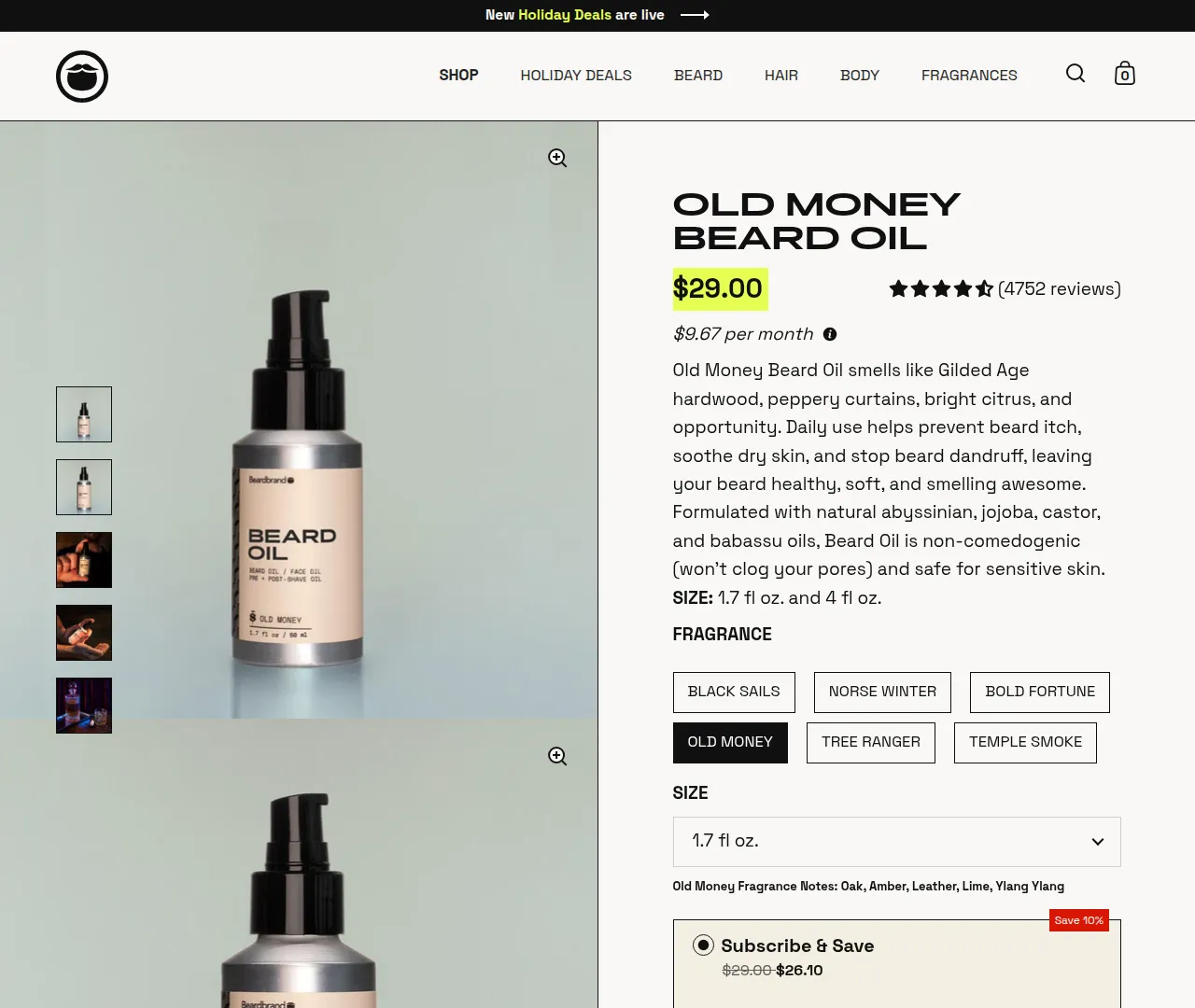
The same thing in Node.js:
import fs from "node:fs/promises";

const params = new URLSearchParams({
  url: "https://example.myshopify.com/products/classic-tee",
  format: "webp",
  width: "1280",
  block_cookies: "true",
  block_ads: "true",
});

const response = await fetch(
  `https://api.screenshotrun.com/v1/screenshots/capture?${params}`,
  { headers: { Authorization: `Bearer ${process.env.SR_API_KEY}` } }
);

const buffer = Buffer.from(await response.arrayBuffer());
await fs.writeFile("shopify-product.webp", buffer);
That gets you the first screen. But if you need the full product page - all images, the reviews section, description blocks - a few more parameters come into play.
Full-page captures with lazy-loaded product images
Shopify themes (Dawn, Debut, most custom themes) lazy-load product gallery images, lifestyle photos in the description, review section thumbnails, even the variant swatches on some themes. A full-page screenshot without scrolling gives you grey placeholders where images should be.
Fix: tell the API to scroll before capturing, and add a delay so images have time to fetch after entering the viewport.
curl "https://api.screenshotrun.com/v1/screenshots/capture?url=https://example.myshopify.com/products/classic-tee&format=webp&width=1280&full_page=true&delay=3000&block_cookies=true&block_ads=true" \
  -H "Authorization: Bearer YOUR_API_KEY" \
  --output shopify-full-page.webp
full_page=true auto-scrolls the entire document and composites the result into one tall image. The 3-second delay gives the browser time to fetch lazy images after the scroll completes. If a store has particularly heavy galleries (20+ product photos), bump that to 5000.

What about stores running review widgets like Judge.me or Loox that load asynchronously? You can be more precise with wait_for_selector:
curl "https://api.screenshotrun.com/v1/screenshots/capture?url=https://example.myshopify.com/products/classic-tee&format=webp&full_page=true&wait_for_selector=.jdgm-rev-widg__reviews&delay=2000&block_cookies=true" \
  -H "Authorization: Bearer YOUR_API_KEY" \
  --output shopify-with-reviews.webp
The API waits until .jdgm-rev-widg__reviews appears in the DOM, then adds the 2-second delay on top. No guessing.
Dealing with cookie consent and Shopify popups
Shopify rolled out their own cookie consent banner in 2024, and most stores using Shopify Markets have it on by default. It parks itself at the bottom of the viewport. On mobile it covers actual product information. Third-party consent apps (OneTrust, Cookiebot) pile their own overlays on top of that.
The block_cookies parameter handles all of these - it intercepts known consent scripts at the network level before they execute, so the banner never renders. No DOM cleanup, no race condition with the popup appearing after your screenshot fires. For more on hiding overlays from screenshots, I wrote a separate deep-dive.
Cookie banners aren't the only overlay problem though. Shopify stores love popups: email signup modals that fire 3 seconds after page load, upsell widgets from ReConvert or Candy Rack, exit-intent popups, those "someone in Texas just bought..." notification bars from FOMO apps. For these, use hide_selectors to target the specific elements:
curl "https://api.screenshotrun.com/v1/screenshots/capture?url=https://example.myshopify.com&format=webp&block_cookies=true&block_chats=true&hide_selectors[]=%23shopify-section-popup&hide_selectors[]=%23ReConvert&hide_selectors[]=.spo-popup-overlay&delay=3000" \
  -H "Authorization: Bearer YOUR_API_KEY" \
  --output shopify-clean.webp
block_chats=true removes live chat widgets (Tidio, Gorgias, Shopify Inbox). The hide_selectors targets store-specific popups you identify by inspecting the DOM once. Those selectors tend to be stable across captures - Shopify app developers rarely rename their root element IDs.
How stealth mode gets past Shopify bot detection
Shopify uses Cloudflare-based bot detection on storefronts. Standard headless Chrome gets flagged maybe 20-30% of the time (depends on the store's security tier and your request volume). When it kicks in, you get either a blank page, a Cloudflare challenge screen, or a redirect to a "verify you're human" interstitial.
The stealth parameter patches the headless browser's fingerprint to look like regular desktop Chrome. It masks navigator.webdriver, fixes Chrome runtime signatures, adjusts the WebGL renderer string (headless Chrome reports "SwiftShader" by default - instant giveaway for bot detectors).
curl "https://api.screenshotrun.com/v1/screenshots/capture?url=https://example.myshopify.com/collections/all&format=webp&stealth=true&block_cookies=true&delay=2000" \
  -H "Authorization: Bearer YOUR_API_KEY" \
  --output shopify-collection.webp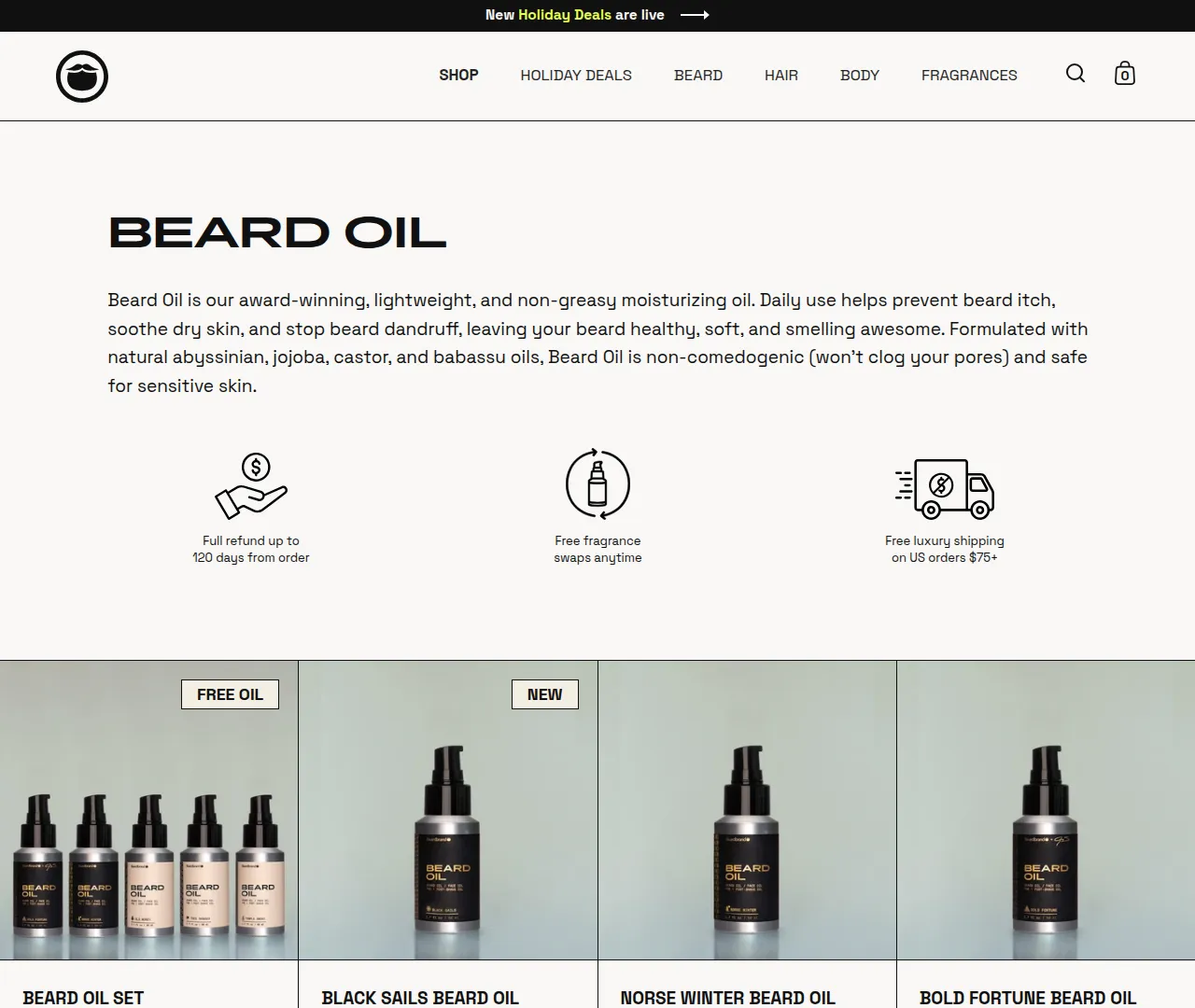
One thing worth knowing: stealth adds 1-2 seconds to capture time because the browser loads additional patches before navigating. For single captures, that's nothing. For bulk jobs with hundreds of URLs, it adds up - so only enable it on stores where you're actually getting blocked.
I've had good results capturing Shopify stores without stealth when the request rate stays under one capture every 5 seconds per domain. Go faster and the bot detection flags requests regardless of your browser fingerprint.
Bulk screenshot every product page from the sitemap
Shopify stores publish their product URLs in a sitemap at /sitemap.xml. The main sitemap links to sub-sitemaps, and /sitemap_products_1.xml lists every product URL. Parse that XML, pull out the <loc> tags. That's your URL list.
This Node.js script pulls every product URL from a Shopify store's sitemap and captures each one:
import fs from "node:fs/promises";
import { parseStringPromise } from "xml2js";

async function getShopifyProductUrls(storeDomain) {
  const sitemapUrl = `https://${storeDomain}/sitemap_products_1.xml`;
  const response = await fetch(sitemapUrl);
  const xml = await response.text();
  const parsed = await parseStringPromise(xml);

  return parsed.urlset.url.map((entry) => entry.loc[0]);
}

async function captureProduct(url) {
  const params = new URLSearchParams({
    url,
    format: "webp",
    width: "1280",
    full_page: "true",
    delay: "3000",
    block_cookies: "true",
    block_ads: "true",
    stealth: "true",
  });

  const res = await fetch(
    `https://api.screenshotrun.com/v1/screenshots/capture?${params}`,
    { headers: { Authorization: `Bearer ${process.env.SR_API_KEY}` } }
  );

  if (!res.ok) throw new Error(`${url}: ${res.status}`);
  return Buffer.from(await res.arrayBuffer());
}

// Capture all products with rate limiting
const urls = await getShopifyProductUrls("competitor-store.com");
console.log(`Found ${urls.length} product URLs`);

for (const url of urls) {
  const buffer = await captureProduct(url);
  const slug = new URL(url).pathname.split("/").pop();
  await fs.writeFile(`captures/${slug}.webp`, buffer);
  console.log(`Captured: ${slug}`);

  // 2-second gap between requests to avoid bot detection
  await new Promise((r) => setTimeout(r, 2000));
}
A store with 500 products takes about 20 minutes at this pace. Need it faster? The ScreenshotRun API handles concurrency on the renderer side - you can run 3-4 parallel requests safely. Just keep the per-domain rate reasonable so Shopify's CDN doesn't throttle you.
For screenshot automation of Shopify product pages on a schedule (daily price checks, competitor tracking), pair this with a cron job or a webhook-based trigger. Our Shopify integration guide covers the webhook approach - screenshotting pages automatically when themes publish or products update.
Mobile and tablet screenshots of Shopify stores
Shopify themes are responsive, and the mobile layout often looks completely different from desktop. Product image carousels replace the gallery grid. The sticky add-to-cart bar appears at the bottom, the navigation collapses into a hamburger menu, and some themes rearrange the entire page structure. If you're monitoring e-commerce listings for MAP compliance or competitive pricing, you probably need both viewport sizes.
# Desktop
curl "https://api.screenshotrun.com/v1/screenshots/capture?url=https://example.myshopify.com/products/classic-tee&format=webp&width=1440&device=desktop&block_cookies=true" \
  -H "Authorization: Bearer YOUR_API_KEY" \
  --output desktop.webp

# Mobile
curl "https://api.screenshotrun.com/v1/screenshots/capture?url=https://example.myshopify.com/products/classic-tee&format=webp&device=mobile&block_cookies=true" \
  -H "Authorization: Bearer YOUR_API_KEY" \
  --output mobile.webp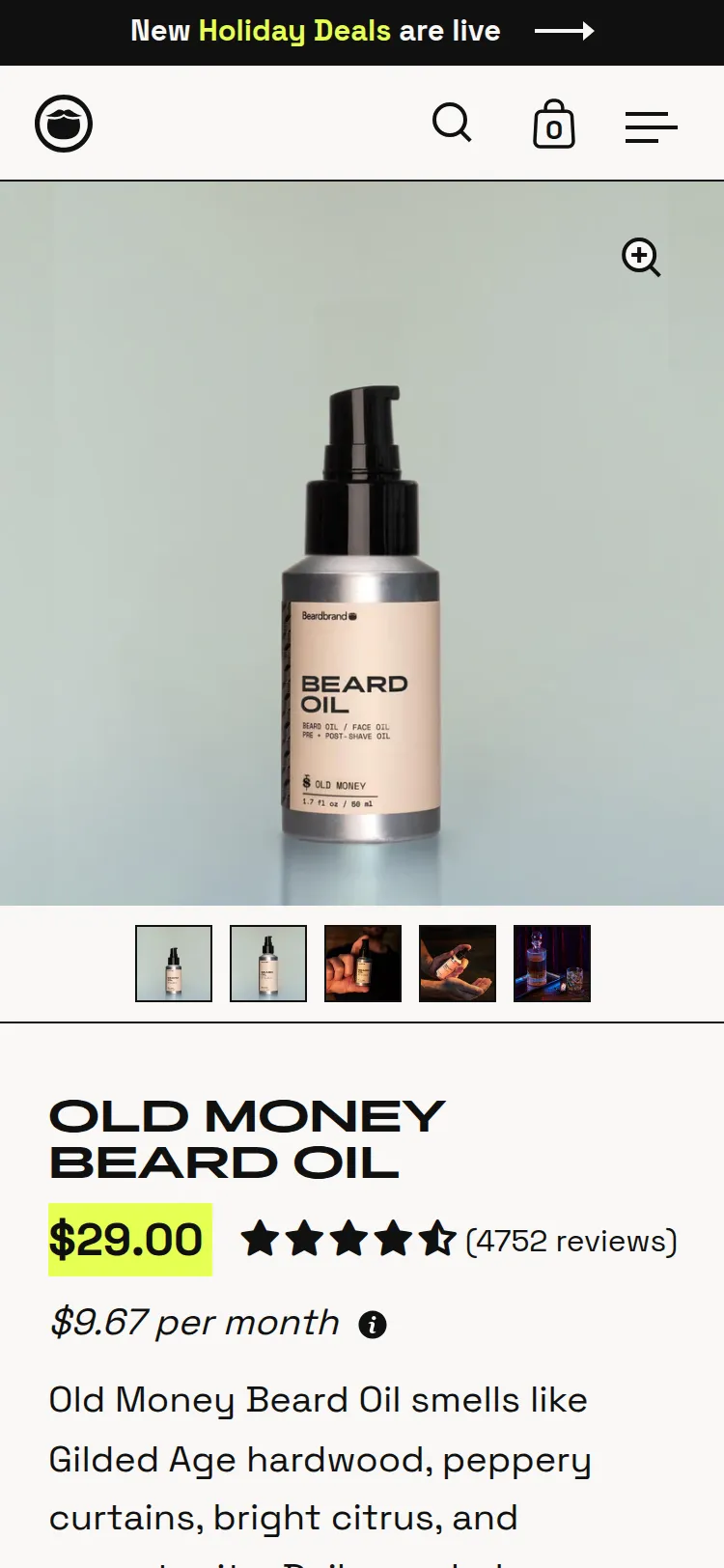
device=mobile sets iPhone viewport dimensions with touch event support. It also sends a mobile user-agent string and the correct device pixel ratio. Shopify themes detect this and serve the mobile layout. Some themes also serve different image sizes via srcset - the mobile capture gets smaller images, which loads faster and produces a smaller file.
Password-protected development stores
Shopify development stores (and stores not yet live) show a password page instead of the actual storefront. Can you screenshot them? Yes, but you need to authenticate through the storefront password gate first. The API supports this through cookie injection:
const params = new URLSearchParams({
  url: "https://dev-store.myshopify.com/products/test-product",
  format: "webp",
  cookies: JSON.stringify([
    {
      name: "storefront_digest",
      value: "YOUR_STOREFRONT_DIGEST_COOKIE",
      domain: "dev-store.myshopify.com",
      path: "/",
    },
  ]),
  block_cookies: "true",
});

const response = await fetch(
  `https://api.screenshotrun.com/v1/screenshots/capture?${params}`,
  { headers: { Authorization: `Bearer ${process.env.SR_API_KEY}` } }
);
To grab the storefront_digest cookie: open the password-protected store in a regular browser, enter the store password, then copy the cookie from DevTools (Application tab > Cookies). The cookie stays valid until the store owner changes the password.
Shopify app developers use this for generating preview screenshots during theme customization, and agencies use it for reviewing client stores before launch.
When Shopify screenshots still come out wrong
Even with all the right parameters, some Shopify-specific edge cases will trip you up:
Geolocation-based pricing. Stores running Shopify Markets show different currencies and prices depending on the visitor's IP. Need screenshots with a specific locale's pricing? Use the geolocation parameter to set the country. Without it, the API server's location determines what prices show up - which probably isn't what you want for MAP enforcement.
A/B testing in themes. Some stores run theme experiments (through Shopify's built-in split testing or apps like Neat A/B Testing). Your screenshots might show different layouts on consecutive captures. Not much to do about this programmatically - just be aware that visual differences between captures might be intentional experiments, not actual storefront changes.
App-injected content loading late. Review widgets, loyalty program bars, upsell carousels - they all load asynchronously through JavaScript. If your screenshot is missing a section visible in a regular browser, increase the delay or use wait_for_selector targeting that widget's container. I usually check the store in DevTools first (Network tab, filter by JS) to see which third-party scripts are loading and how long they take.
Shopify's rate limiting. Hit the same store more than once per second and you'll start getting throttle pages instead of the actual storefront. Space your requests out. For ongoing monitoring jobs, 2-3 seconds between requests per domain works reliably (I've tested this across dozens of stores over multi-week monitoring runs).
FAQ#
Yes. Pass the storefront_digest cookie via the cookies parameter. Open the store in a browser, enter the password, copy the cookie from DevTools, and include it in your API call. The cookie stays valid until the store owner changes the password.
Shopify themes lazy-load images below the fold. Use full_page=true so the renderer scrolls the page, plus a delay of 3000-5000ms to give images time to load after they enter the viewport.
Set block_cookies=true in your API call. This intercepts consent scripts at the network level before they execute, so the banner never renders. It works on both Shopify native consent and third-party apps like OneTrust or Cookiebot.
Enable stealth=true to patch the browser fingerprint. It masks navigator.webdriver, fixes Chrome runtime signatures, and adjusts the WebGL renderer string. Keep request rates under one capture every 5 seconds per domain to avoid triggering detection.
Parse the store sitemap at /sitemap_products_1.xml to get every product URL. Loop through the URLs with the ScreenshotRun API, adding a 2-second delay between requests to avoid rate limiting. A store with 500 products takes about 20 minutes at this pace.