ScreenshotRun is a Rails screenshot API that turns any URL into a PNG, JPEG, WebP, AVIF, or PDF through one Faraday request. No Chrome binary on your server, no Node dependency creeping into a Ruby codebase.
Most Rails teams that need website screenshots reach for Grover or wicked_pdf. Grover shells out to Puppeteer, which means Node.js rides along in your Docker image. wicked_pdf leans on wkhtmltopdf, a project frozen since 2020 on a WebKit fork that can't parse modern CSS grid or container queries. And then there's the memory story: a headless Chrome tab competing with your Puma workers can double the resident set of a single process. An HTTP call through Faraday sidesteps all of that.
Your first screenshot from Rails
You'll need an API key from the ScreenshotRun dashboard. The free tier covers 200 monthly captures with full parameter access, no credit card required.
Add Faraday to your Gemfile if it's not there already:
bundle add faradayTest the call from a Rails console session:
response = Faraday.get(
  'https://api.screenshotrun.com/v1/screenshots/capture',
  {
    url: 'https://github.com',
    format: 'png',
    response_type: 'image'
  },
  { 'Authorization' => "Bearer #{Rails.application.credentials.screenshotrun_api_key}" }
)

File.binwrite(Rails.root.join('tmp', 'github.png'), response.body)
puts "Saved: #{response.body.bytesize / 1024} KB"
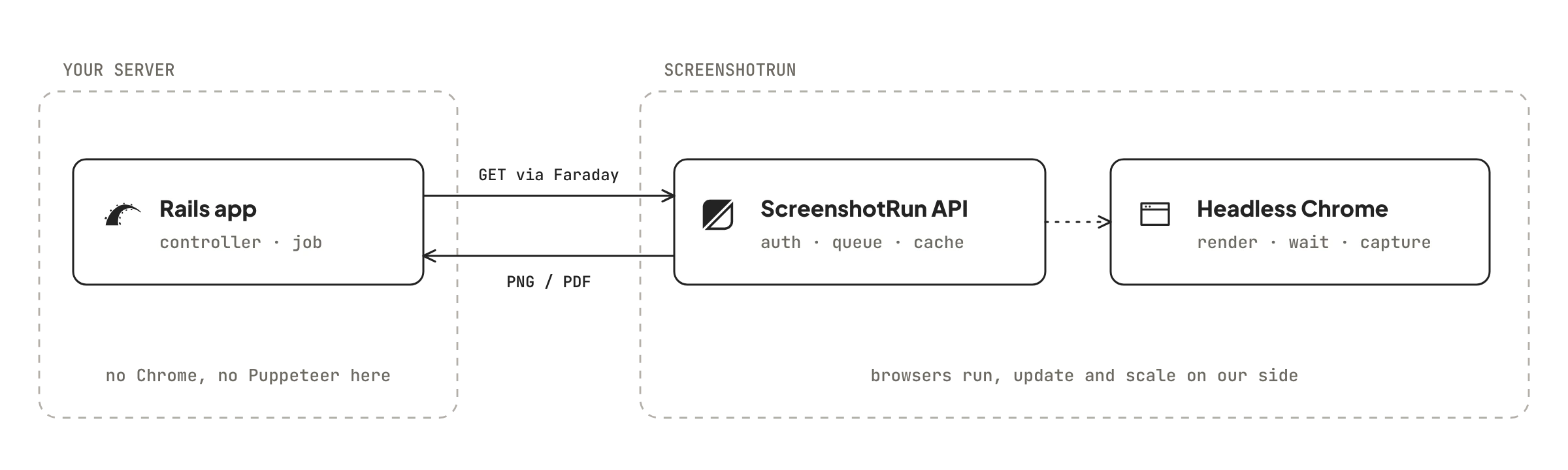
Four lines. The API renders the page in a headless browser on our side, waits for JavaScript to finish, and streams back raw image bytes. Your Rails process never touches Chrome.
Store the API key with Rails credentials
Rails ships with an encrypted credentials system. Why scatter ENV variables across your infrastructure when the framework already handles secret storage?
EDITOR="code --wait" bin/rails credentials:editAdd your key inside the file that opens:
screenshotrun_api_key: sr_live_abc123xyzAccess it anywhere in your app with Rails.application.credentials.screenshotrun_api_key. The value stays encrypted in config/credentials.yml.enc and only decrypts at runtime using your master key.
But CI environments and Docker builds often don't have the master key. Create an initializer that falls back to ENV:
# config/initializers/screenshotrun.rb

Rails.application.config.screenshotrun = ActiveSupport::OrderedOptions.new
Rails.application.config.screenshotrun.api_key =
  Rails.application.credentials.screenshotrun_api_key ||
  ENV['SCREENSHOTRUN_KEY']
Rails.application.config.screenshotrun.base_url =
  'https://api.screenshotrun.com/v1/screenshots/capture'
Rails.application.config.screenshotrun.timeout = 60
Now every part of your app reads from Rails.application.config.screenshotrun.api_key. Credentials in production, ENV in CI. One lookup, zero conditionals scattered across service classes.
Screenshot service object
Rails convention puts API wrappers in app/services/. A single class handles parameter building, error responses, and timeout configuration:
# app/services/screenshot_service.rb

class ScreenshotService
  class CaptureError < StandardError; end

  def initialize
    config = Rails.application.config.screenshotrun
    @conn = Faraday.new(url: config.base_url) do |f|
      f.request :url_encoded
      f.adapter Faraday.default_adapter
    end
    @api_key = config.api_key
    @timeout = config.timeout
  end

  def capture(url, format: 'png', width: 1280, full_page: false, **options)
    response = @conn.get do |req|
      req.headers['Authorization'] = "Bearer #{@api_key}"
      req.options.timeout = @timeout
      req.params = {
        url: url,
        format: format,
        width: width,
        full_page: full_page,
        response_type: 'image'
      }.merge(options).compact
    end

    unless response.success?
      raise CaptureError, "HTTP #{response.status}: #{response.body.first(200)}"
    end

    response.body
  end
end
Call it from anywhere:
service = ScreenshotService.new

bytes = service.capture('https://stripe.com', format: 'webp', width: 1440, full_page: true)
File.binwrite(Rails.root.join('tmp', 'stripe.webp'), bytes)

# Element screenshot — just the pricing table
bytes = service.capture('https://stripe.com/pricing', selector: '.pricing-table')

# PDF export
pdf = service.capture('https://example.com/invoice', format: 'pdf')
The **options splat means any API parameter works without changing the method signature. Need dark_mode? Pass it. Need block_ads? Same thing. The service forwards everything to the query string.
Why push captures to a background job?
A screenshot call blocks for a few seconds (longer for JavaScript-heavy pages). That's enough to tie up a Puma thread and slow down unrelated requests. Move the work to ActiveJob and let the controller return immediately:
# app/jobs/capture_screenshot_job.rb

class CaptureScreenshotJob < ApplicationJob
  queue_as :default

  retry_on ScreenshotService::CaptureError, wait: :polynomially_longer, attempts: 4
  retry_on Faraday::TimeoutError, wait: 10.seconds, attempts: 3
  discard_on Faraday::ConnectionFailed

  def perform(url, storage_path, format: 'png', **options)
    bytes = ScreenshotService.new.capture(url, format: format, **options)

    dir = File.dirname(Rails.root.join('storage', storage_path))
    FileUtils.mkdir_p(dir)
    File.binwrite(Rails.root.join('storage', storage_path), bytes)

    Rails.logger.info "[Screenshot] Saved #{storage_path} (#{bytes.bytesize / 1024} KB)"
  end
end
Dispatch it:
# Single capture
CaptureScreenshotJob.perform_later('https://github.com', 'screenshots/github.png')

# Batch — fire off 20 jobs at once
urls = %w[https://github.com https://gitlab.com https://bitbucket.org]
urls.each do |url|
  slug = URI.parse(url).host.tr('.', '-')
  CaptureScreenshotJob.perform_later(url, "screenshots/#{slug}.png")
end
The retry_on declaration handles transient failures automatically. Polynomial backoff spaces retries further apart on each attempt (5s, 25s, 125s), which prevents hammering the API when it's already under load. About 8% of our captures need a retry, and almost all are SPAs with client-side hydration timing issues. The discard_on for connection failures drops jobs that can't even reach the network, since retrying those usually means something bigger is broken.
Works with Sidekiq 7, GoodJob, Solid Queue, or any ActiveJob backend. Adapter-agnostic. The job class doesn't care which one runs it.
Attach screenshots to models with ActiveStorage
Why write files to disk when ActiveStorage can attach them directly to your models? Create a concern that any model can include:
# app/models/concerns/screenshottable.rb

module Screenshottable
  extend ActiveSupport::Concern

  included do
    has_one_attached :screenshot
  end

  def capture_screenshot!(url = nil, **options)
    target = url || screenshot_url
    raise ArgumentError, 'No URL provided and model has no screenshot_url method' unless target

    bytes = ScreenshotService.new.capture(target, **options)

    screenshot.attach(
      io: StringIO.new(bytes),
      filename: "screenshot-#{id}-#{Time.current.to_i}.#{options.fetch(:format, 'png')}",
      content_type: options.fetch(:format, 'png') == 'pdf' ? 'application/pdf' : "image/#{options.fetch(:format, 'png')}"
    )
  end
end
Include it in any model:
# app/models/website.rb

class Website < ApplicationRecord
  include Screenshottable

  def screenshot_url
    url # assumes the model has a `url` column
  end
end
Now screenshots live in your ActiveStorage backend (S3, GCS, local disk, whatever you've configured):
website = Website.find(42)
website.capture_screenshot!(format: 'webp', width: 1920)

# In a view
image_tag website.screenshot if website.screenshot.attached?

# Grab the URL for an API response
url_for(website.screenshot)
This pattern works well for dashboard screenshot features or brand monitoring tools where each record tracks its own visual state. And because ActiveStorage handles variants, you can generate thumbnails on the fly without re-calling the API.
Scheduled captures
For recurring screenshots (daily monitoring, weekly archives), you have two clean options in Rails.
Option one: the whenever gem wraps crontab in Ruby syntax:
# config/schedule.rb (whenever gem)

every 1.day, at: '6:00 am' do
  runner 'ScheduledScreenshotService.capture_all'
end
# app/services/scheduled_screenshot_service.rb
class ScheduledScreenshotService
MONITORED_URLS = %w[
https://your-app.com
https://competitor-one.com
https://competitor-two.com
].freeze
def self.capture_all
MONITORED_URLS.each do |url|
slug = URI.parse(url).host.tr('.', '-')
date = Date.current.iso8601
CaptureScreenshotJob.perform_later(
url,
"monitoring/#{slug}/#{date}.png",
full_page: true
)
end
end
endAlternatively, if your deploy platform already runs rails runner on a schedule (Heroku Scheduler, Render cron jobs), skip the gem:
rails runner 'ScheduledScreenshotService.capture_all'Either way, screenshots land in date-stamped paths. Compare Monday's capture to Friday's to spot layout changes, broken deploys, or competitor redesigns. Pair this with visual change monitoring for automated diff detection.
Controller endpoint for on-demand screenshots
Expose a screenshot route that your frontend or mobile app can call. The API key stays server-side, and you control rate limiting through your own auth layer:
# app/controllers/api/screenshots_controller.rb

module Api
  class ScreenshotsController < ApplicationController
    before_action :authenticate_user!

    def capture
      bytes = ScreenshotService.new.capture(
        params.require(:url),
        format: params.fetch(:format, 'png'),
        width: params.fetch(:width, 1280).to_i
      )

      content_type = case params.fetch(:format, 'png')
                     when 'jpeg' then 'image/jpeg'
                     when 'webp' then 'image/webp'
                     when 'avif' then 'image/avif'
                     when 'pdf'  then 'application/pdf'
                     else 'image/png'
                     end

      expires_in 1.hour, public: true
      send_data bytes, type: content_type, disposition: 'inline'

    rescue ScreenshotService::CaptureError => e
      render json: { error: e.message }, status: :bad_gateway
    end
  end
end
# config/routes.rb
namespace :api do
get 'screenshot', to: 'screenshots#capture'
endThe expires_in call sets Cache-Control headers so browsers and CDNs cache the image for an hour. Repeated requests for the same URL don't hit the API twice. Your frontend just points an <img> tag at /api/screenshot?url=https://example.com and Rails handles the rest.
API parameters
Pass these as a hash to ScreenshotService#capture. Faraday converts them into query string parameters on the GET request:
| Parameter | Type | Default | What it does |
|---|---|---|---|
url | string | required | The page to capture |
format | string | png | Output format: png, jpeg, webp, avif, or pdf |
width | integer | 1280 | Viewport width in pixels |
height | integer | 720 | Viewport height in pixels |
full_page | boolean | false | Scroll end-to-end and stitch the result into one tall image |
device | string | desktop | Preset viewport: desktop, mobile, or tablet |
retina | boolean | false | 2x pixel density for HiDPI displays. File size quadruples because both axes double |
dark_mode | boolean | false | Trigger the page's dark color scheme via prefers-color-scheme |
selector | string | — | Crop to a specific element by CSS selector |
delay | integer | — | Milliseconds to wait after load before capturing |
wait_for_selector | string | — | Pause until this element appears in the DOM |
block_cookies | boolean | false | Auto-dismiss GDPR and CCPA consent dialogs |
block_ads | boolean | false | Filter out display ads and third-party tracking pixels |
block_chats | boolean | false | Suppress floating support bubbles (the widgets that slide in from corners) |
css | string | — | Custom CSS injected before the capture |
js | string | — | JavaScript executed after page load, before the screenshot |
stealth | boolean | false | Bypass bot-detection scripts on protected pages |
The full parameter reference lives in the API documentation. Setting delay: 0 is not the same as omitting it. Zero explicitly skips our auto-wait heuristics, which matters for pages where you want the fastest possible capture without any smart delays.
Rendering variants: dark theme, element cropping, CSS injection
Dark mode
One parameter flips the browser's color scheme preference before the page starts rendering. Sites that respect prefers-color-scheme: dark (GitHub, Tailwind docs, most modern apps) will show their dark variant:
bytes = service.capture('https://github.com', dark_mode: true)Chrome on Linux renders fonts differently from macOS. Helvetica falls back to Liberation Sans. So if your dark-mode screenshots look slightly off compared to your local browser, that's font substitution, not a rendering bug.
Element screenshots
The selector parameter crops the output to a single DOM element. Useful when you only need a pricing table, a hero section, or a specific chart without the rest of the page around it:
bytes = service.capture('https://stripe.com/pricing', selector: '.PricingTable')Style overrides with CSS injection
Override page styles before the capture fires. Kill a fixed header that blocks the hero, zero out an overlay's opacity, or swap in a solid background for visual consistency:
bytes = service.capture('https://example.com',
  css: 'nav.sticky { display: none !important; } .promo-modal { opacity: 0; }'
)
You can combine all three in one request hash. The service object forwards dark_mode, selector, and css together, and the API applies them in sequence before taking the shot.
What happens when a capture fails?
Faraday supports middleware for automatic retries. Add faraday-retry to your Gemfile and configure it in the service object:
bundle add faraday-retry# Updated connection setup in ScreenshotService#initialize
@conn = Faraday.new(url: config.base_url) do |f|
f.request :url_encoded
f.request :retry, {
max: 3,
interval: 0.5,
interval_randomness: 0.5,
backoff_factor: 2,
retry_statuses: [429, 500, 502, 503],
retry_if: ->(env, _exception) { env.status.nil? }
}
f.adapter Faraday.default_adapter
endThe retry middleware handles rate limits (429) and server errors (5xx) with exponential backoff. Client errors like 401 or 422 pass through immediately because retrying a bad API key or a missing URL parameter won't fix anything. The interval_randomness adds jitter so batch jobs don't all retry at the exact same moment.
For timeouts, set both open and read limits:
@conn = Faraday.new(url: config.base_url) do |f|
  f.options.timeout = 60      # read timeout
  f.options.open_timeout = 10  # connection timeout
  # ... middleware
end
Sixty seconds is generous. Most captures wrap up in under five seconds. But full-page screenshots of JavaScript-heavy dashboards can take longer, especially when the page lazy-loads content on scroll. Better to wait and get the image than to timeout and waste the API call.
Rails screenshot API vs Grover and wicked_pdf
If you've worked with screenshots in Rails before, you've probably used one of two gems. Grover is the most common choice today: it wraps Puppeteer through a Node.js subprocess and gives you access to a full Chromium instance. wicked_pdf is the older option, built on wkhtmltopdf, a WebKit fork that handles basic HTML-to-PDF conversion but struggles with modern CSS or JavaScript. Both work fine on a dev laptop where Chrome is already installed. Production is where the tradeoffs show up. We've seen Rails apps on Heroku hit their dyno memory ceiling within minutes of running Grover under load.
ScreenshotRun takes a different route: no gems to install beyond Faraday, no binaries to maintain, no Chrome eating into your dyno's memory budget. You send an HTTP request, we render the page on our infrastructure, and you get back an image. The entire browser lifecycle stays off your server. For teams that just need URLs turned into screenshots without babysitting a headless Chrome setup, it's the path of least resistance.
Here's how the three approaches compare side by side:
| Grover | wicked_pdf | ScreenshotRun API | |
|---|---|---|---|
| Runtime dependencies | Node.js + Puppeteer + Chromium | wkhtmltopdf binary | None (Faraday only) |
| Docker image overhead | +500 MB for Node + Chrome | +80 MB for wkhtmltopdf | 0 MB added |
| Modern JS/CSS support | Full (Chromium) | Partial (old WebKit) | Full (Playwright + Chromium) |
| Memory per render | Chrome tab on top of your Puma worker | 50-100 MB | Your Puma workers stay lean |
| Output formats | PNG, JPEG, PDF | PDF only | PNG, JPEG, WebP, AVIF, PDF |
| Cookie/ad blocking | Write Puppeteer scripts | Not supported | One parameter each |
| Dark mode capture | Manual emulation code | Not supported | dark_mode: true |
| Heroku / Render | Buildpack for Chrome + Node | Buildpack for wkhtmltopdf | Works on any Ruby host |
| Fly.io / Docker | Multi-stage build, font packages | Simpler but limited | Standard Ruby image |
| Cost | Free gem, but Chrome hosting adds to your EC2/Heroku bill | Free gem + wkhtmltopdf binary | 200 free captures/month, then plans from $9 |
Grover is the right choice when you need to render your own Rails views as PDFs (invoices, reports) with full access to the controller context. wicked_pdf still has a place for teams locked into wkhtmltopdf templates they can't migrate yet. But for capturing external URLs at scale (monitoring, thumbnails, archival, e-commerce listing snapshots), the API approach strips an entire infrastructure layer out of your deploy pipeline.
One honest limitation: the API adds network latency that local rendering doesn't have. If you're generating PDFs of your own views and Chrome is already on the box, Grover will be faster per-render. The tradeoff flips once you're capturing external sites, running on constrained hosting, or scaling past a handful of concurrent renders. That's where a hosted Rails screenshot API pays for itself.
The plain Ruby integration guide covers the same API with Net::HTTP and Faraday outside of Rails, if you need screenshots in a Sinatra app or a standalone script.
FAQ#
No. ScreenshotRun renders pages on our infrastructure using headless Chromium. Your Rails app only makes an HTTP request through Faraday — no browser binaries, no Node.js dependency, no Puppeteer.
The API returns raw image bytes. Wrap them in a StringIO and call attach() on any ActiveStorage association. The Screenshottable concern shown in this guide handles it automatically for any model that includes it.
Yes. The CaptureScreenshotJob example in this guide works with any ActiveJob backend — Sidekiq, GoodJob, Solid Queue, or Async. Background processing keeps your Puma threads free for web requests.
Grover requires Node.js and Chromium in your Docker image (adding ~500 MB). wicked_pdf relies on wkhtmltopdf, which cannot render modern CSS grid or JavaScript. ScreenshotRun needs only Faraday, supports all modern web features, and offloads browser memory from your server.
PNG, JPEG, WebP, AVIF, and PDF. Pass the format parameter to ScreenshotService#capture. The free tier includes all formats — there is no format restriction on any plan.