
 Vitalii Holben
Why Instagram Breaks Your Screenshots (And How to Fix It with Playwright)
Instagram shows two login popups, triggers React re-renders when you hide them wrong, and locks scrollHeight to the viewport. Three problems, three fixes for Playwright and Puppeteer.

A user tried to screenshot an Instagram profile through our API. All they got back was a login form covering the entire screen. They tried five times, got the same result, and stopped using the service.
The pages worked fine in a normal browser. The problem was specific to headless browsers — Instagram detects them and blocks the content with a registration popup.
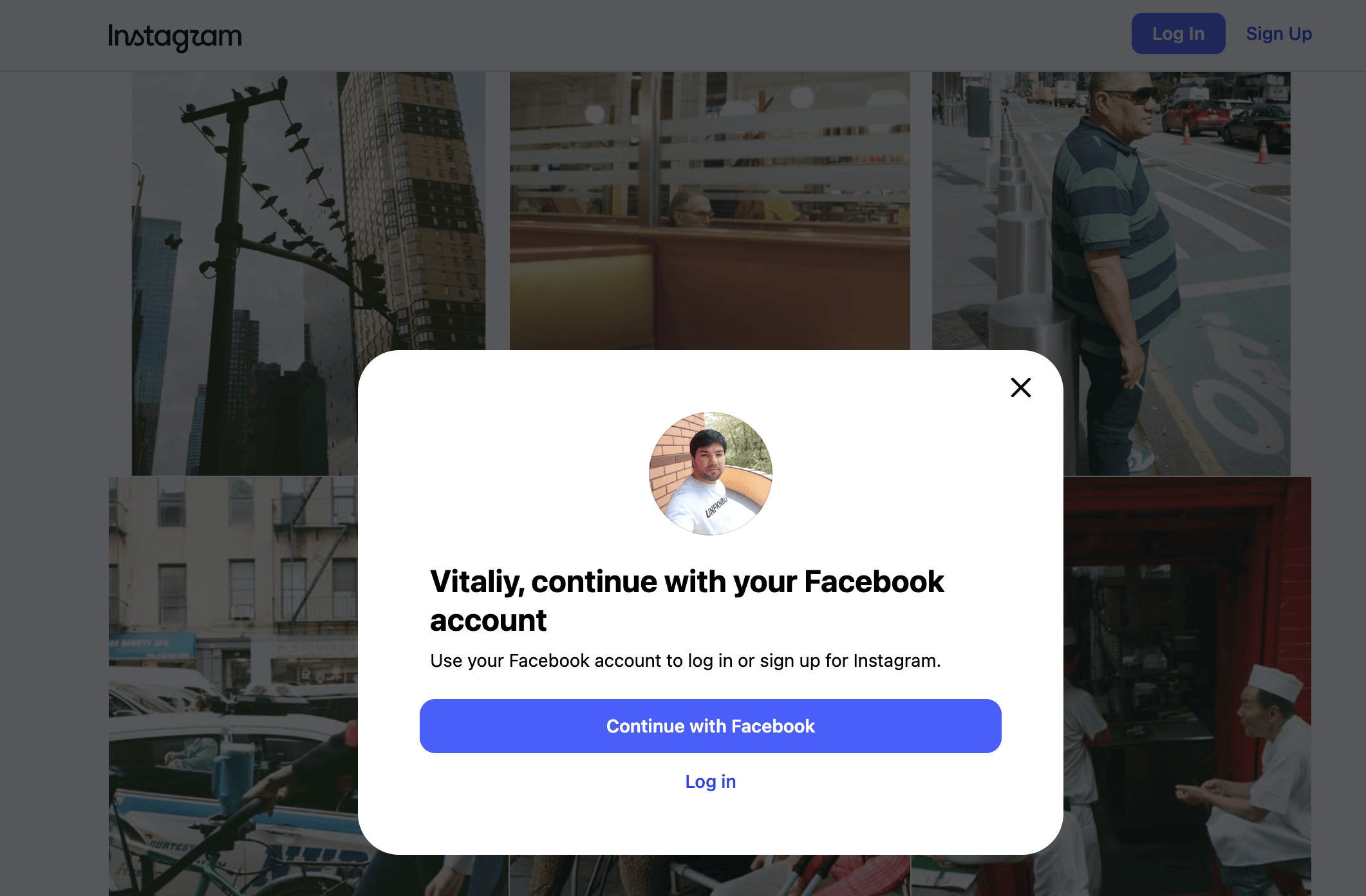
If you're taking Instagram screenshots with Playwright or Puppeteer, you'll run into three problems. Each one feels like your code is broken. It's not — Instagram is actively blocking headless browsers.
Instagram's two login popups (and why Playwright misses the second)
Instagram doesn't show one popup. It shows two, and they have different markup.
The first modal is the main registration form — the one with Facebook and email sign-up options. In DevTools you'll see aria-modal="true" on its container. Easy to find with a [aria-modal="true"] selector.
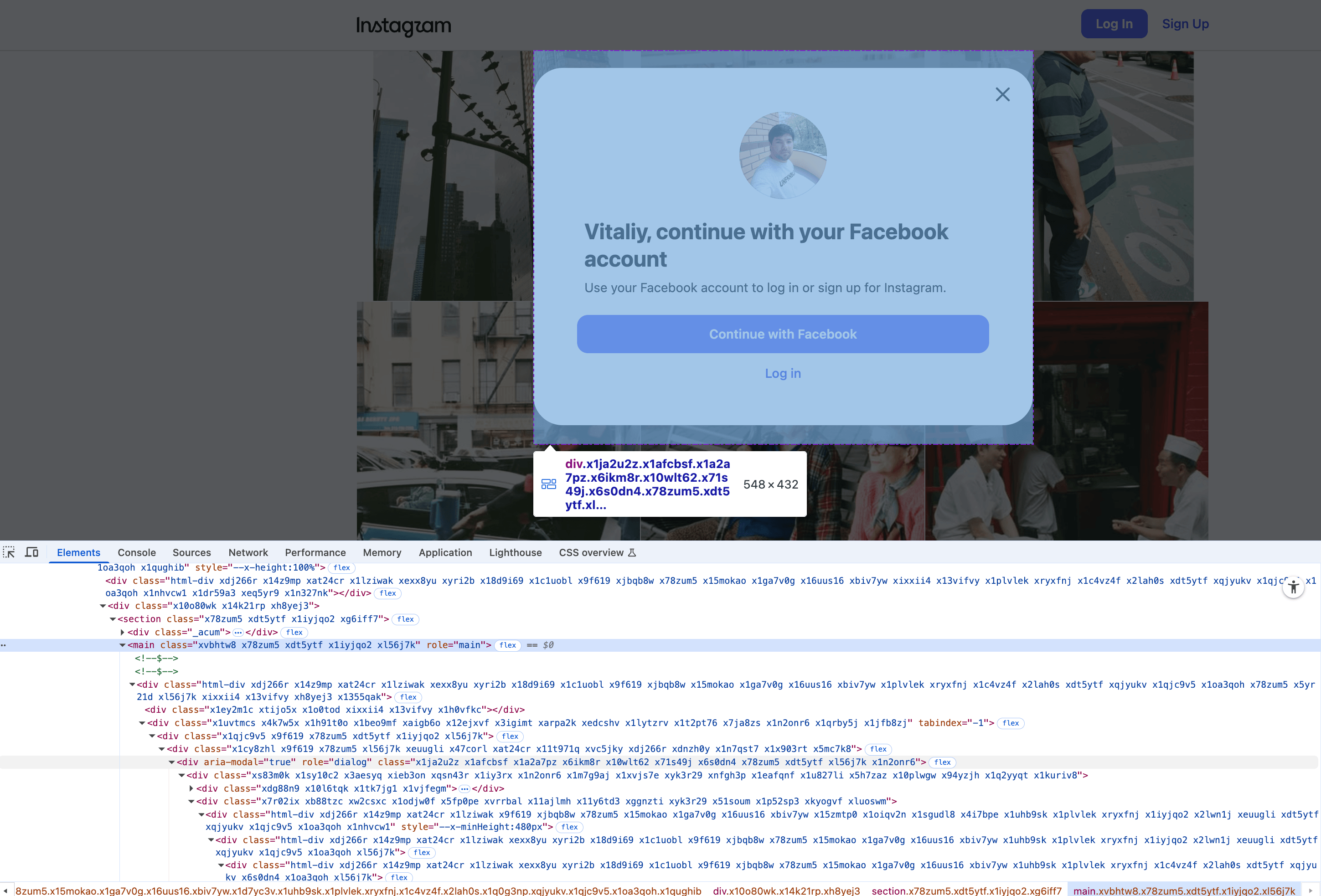
The second popup is sneakier. "Never miss a post" appears underneath or after the first one, and it only carries role="dialog". No aria-modal. If you only target [aria-modal="true"], this one stays on screen and you get a screenshot with a semi-transparent overlay and a sign-up prompt sitting on top of the feed.
Both popups need to go. Target them together:
[role="dialog"] {
  visibility: hidden !important;
  opacity: 0 !important;
  pointer-events: none !important;
}
[role="presentation"] {
  visibility: hidden !important;
  opacity: 0 !important;
  pointer-events: none !important;
}
The visibility: hidden choice isn't cosmetic. Use display: none instead, and you'll hit problem number two, one that cost me most of an afternoon.
The React re-render trap
My first attempt was obvious. Inject display: none !important on both dialogs, take the screenshot, move on. The popup disappeared. The screenshot looked clean.
Except the post descriptions were gone. Comments, gone. Engagement counts, gone. The page looked like a skeleton of itself: profile photo, grid thumbnails, nothing else. I thought the page hadn't finished loading. Added a 5-second delay. Same result. Added networkidle. Same result.
Turns out Instagram's React monitors DOM layout changes. display: none removes the element from layout flow. React's reconciliation picks that up and triggers a re-render. During that re-render, Instagram's application code apparently decides the page state is invalid and strips out content it considers gated behind authentication. Post descriptions, comment previews, follower counts on some pages.
visibility: hidden doesn't trigger this. The element stays in the layout, occupies its original space, but becomes invisible. React doesn't notice because nothing moved. opacity: 0 is a belt-and-suspenders addition: even if visibility has a quirk on some render path, zero opacity ensures the popup is visually gone.
// The wrong way — triggers React re-render, loses content
[role="dialog"] { display: none !important; }

// The right way — hides visually, preserves layout, React stays calm
[role="dialog"] {
  visibility: hidden !important;
  opacity: 0 !important;
  pointer-events: none !important;
}
pointer-events: none prevents the hidden dialog from intercepting clicks if you're scrolling or clicking "Show more" before capture.
For a deeper look at handling React and other SPA frameworks during screenshot capture, see our SPA screenshots guide.
Pinterest, LinkedIn, and X have similar login walls, but their modals play nice with display: none. Instagram is the outlier because its React layer is more aggressive about monitoring the DOM tree.
Why you can't use CSS class selectors
Someone on Stack Overflow suggested targeting Instagram's popup by class name. Something like .x1h0vfkc or .xoegz02. Don't.
During testing I saved two class names that targeted the modal container: .x1h0vfkc on Monday and .xoegz02 on Wednesday. Same popup, same DOM position, completely different selectors.
ARIA selectors survive Instagram's build pipeline. CSS class names don't. They change every deploy.
Instagram uses obfuscated CSS class names generated at build time. Every time Meta deploys a new version (which happens multiple times per week), those class names rotate. A selector that works on Monday breaks by Wednesday. I've seen it happen three times during testing for this post alone.
ARIA attributes like role="dialog" and role="presentation" are stable because they're accessibility features tied to the HTML spec, not build artifacts. Screen readers rely on them. Instagram won't strip them without breaking accessibility compliance. Use ARIA selectors for anything you expect to survive across deploys.
The full-page crop: why Playwright Instagram screenshots get cut off
Popups handled. Content intact. Time for a full-page screenshot. I set fullPage: true in Playwright and got back a screenshot cropped to exactly 800 pixels tall. The viewport height. Not the page. If your Instagram full page screenshot comes out cropped, this is why.
Playwright's fullPage reads document.documentElement.scrollHeight to determine how tall the page is. Instagram locks that to 100vh.
Inspect the <html> element on any Instagram page. You'll find CSS classes that set overflow: hidden and height: 100% on both html and body. When the popup is visible, Instagram doesn't want you scrolling, so it locks the document height to exactly one viewport. documentElement.scrollHeight returns that locked value, and Playwright's fullPage: true captures only that.
// Step 1: Override the scroll lock and hide popups
const popupCSS = `
  [role="dialog"] { visibility: hidden !important; opacity: 0 !important; pointer-events: none !important; }
  [role="presentation"] { visibility: hidden !important; opacity: 0 !important; pointer-events: none !important; }
  html, body { overflow: auto !important; height: auto !important; }
`;

await page.addStyleTag({ content: popupCSS });

// Step 2: Measure real content height from body, not documentElement
const realHeight = await page.evaluate(() => document.body.scrollHeight);

// Step 3: Resize viewport to contain the full content
await page.setViewportSize({ width: 1280, height: realHeight });

// Step 4: Re-inject CSS — React may re-render on viewport resize
await page.addStyleTag({ content: popupCSS });

// Step 5: Wait for React to settle after the resize
await page.waitForTimeout(500);

// Step 6: Capture with fullPage OFF — viewport IS the full page now
const screenshot = await page.screenshot({ fullPage: false });
Notice step 4. When you resize the viewport, Instagram's React layer sometimes re-renders, which can bring back the popup styles or re-apply the scroll lock. Re-injecting the CSS after resize handles that. The 500ms wait gives React time to finish its reconciliation pass before capture.
I won't pretend this is elegant. It's a workaround for a site that actively fights headless browsers. But it produces a clean, full-length capture of Instagram profile pages and post pages without the login wall.
The complete Playwright Instagram screenshot script
Putting all three fixes together into something you can actually run:
const { chromium } = require('playwright');

(async () => {
  const browser = await chromium.launch();
  const context = await browser.newContext({
    viewport: { width: 1280, height: 800 },
    userAgent: 'Mozilla/5.0 (Macintosh; Intel Mac OS X 10_15_7) ' +
               'AppleWebKit/537.36 (KHTML, like Gecko) ' +
               'Chrome/120.0.0.0 Safari/537.36'
  });

  const page = await context.newPage();

  const popupCSS = `
    [role="dialog"] {
      visibility: hidden !important;
      opacity: 0 !important;
      pointer-events: none !important;
    }
    [role="presentation"] {
      visibility: hidden !important;
      opacity: 0 !important;
      pointer-events: none !important;
    }
    html, body {
      overflow: auto !important;
      height: auto !important;
    }
  `;

  await page.goto('https://www.instagram.com/natgeo/', {
    waitUntil: 'networkidle'
  });

  // Hide popups without triggering React re-render
  await page.addStyleTag({ content: popupCSS });
  await page.waitForTimeout(1000);

  // Measure the real page height (body, not documentElement)
  const realHeight = await page.evaluate(() => document.body.scrollHeight);

  // Resize viewport to full content height
  await page.setViewportSize({ width: 1280, height: realHeight });

  // Re-inject CSS after resize (React may re-render)
  await page.addStyleTag({ content: popupCSS });
  await page.waitForTimeout(500);

  // Capture with fullPage OFF — viewport matches content
  await page.screenshot({
    path: 'instagram-full.png',
    fullPage: false
  });

  await browser.close();
})();
A few details that tripped me up during testing. The custom userAgent string matters. Instagram serves different page structures to detected bots, and the default Playwright user agent gets flagged immediately. Setting a real Chrome UA gives you the standard public-facing page with the login popup instead of a hard redirect to the login screen.
waitUntil: 'networkidle' waits for zero network requests over 500ms. Instagram loads images asynchronously after initial render, so domcontentloaded fires too early. You'll get a page with gray placeholder boxes where the grid thumbnails should be.
When this breaks (and it will)
I should be honest: this approach works today, September 2026. Instagram changes their frontend regularly. Meta ships new React builds multiple times a week, and any of these could shift how the popups render, what ARIA attributes they carry, or how scroll locking works.
What I'd check first when it stops working:
- Instagram moves from
role="dialog"to a custom attribute for their popups. You'd need to inspect DevTools again and find the new selector. - They switch to a scroll-jacking approach where
body.scrollHeightis also locked. You'd need to measure actual content by walking the DOM tree. - They detect the
visibility: hiddentrick and re-render anyway. At that point you're looking at authenticated sessions as the only reliable path.
Sites like Instagram are a moving target. Every fix has a shelf life.
Puppeteer Instagram screenshot: the equivalent script
To remove the Instagram login popup in Puppeteer, the logic is identical to Playwright but the API calls differ slightly. If you're on Puppeteer instead of Playwright:
const puppeteer = require('puppeteer');

(async () => {
  const browser = await puppeteer.launch();
  const page = await browser.newPage();

  await page.setViewport({ width: 1280, height: 800 });
  await page.setUserAgent(
    'Mozilla/5.0 (Macintosh; Intel Mac OS X 10_15_7) ' +
    'AppleWebKit/537.36 (KHTML, like Gecko) ' +
    'Chrome/120.0.0.0 Safari/537.36'
  );

  const popupCSS = `
    [role="dialog"] { visibility: hidden !important; opacity: 0 !important; pointer-events: none !important; }
    [role="presentation"] { visibility: hidden !important; opacity: 0 !important; pointer-events: none !important; }
    html, body { overflow: auto !important; height: auto !important; }
  `;

  await page.goto('https://www.instagram.com/natgeo/', {
    waitUntil: 'networkidle0'
  });

  await page.addStyleTag({ content: popupCSS });
  await page.waitForTimeout(1000);

  const realHeight = await page.evaluate(() => document.body.scrollHeight);
  await page.setViewport({ width: 1280, height: realHeight });

  await page.addStyleTag({ content: popupCSS });
  await page.waitForTimeout(500);

  await page.screenshot({
    path: 'instagram-full.png',
    fullPage: false
  });

  await browser.close();
})();
Puppeteer uses networkidle0 instead of Playwright's networkidle, and setViewport instead of setViewportSize. Everything else maps one-to-one. The popup CSS, the body.scrollHeight measurement, the re-injection after resize.
Handling cookie overlays on Instagram screenshots
If you're capturing Instagram from a European IP (or through a proxy with EU geolocation), you'll get a GDPR cookie consent banner stacked on top of the login popups. That's three overlays fighting for the viewport. The cookie banner usually sits in a [role="dialog"] as well, so the CSS injection above catches it. But if Instagram changes the cookie banner's markup, you may need cookie blocking as a separate layer.
Instagram detects headless browsers and displays two overlapping login modals: a registration form with aria-modal="true", and a "Never miss a post" popup with only role="dialog". Both appear automatically on any public Instagram page when accessed without authentication. Playwright's default user agent is flagged as a bot, which can trigger an even harder redirect to the login screen — setting a real Chrome user agent string gives you the standard page with removable popups instead.
Inject CSS that targets [role="dialog"] and [role="presentation"] with visibility: hidden !important, opacity: 0 !important, and pointer-events: none !important. Do not use display: none — it removes elements from layout flow, which triggers Instagram's React reconciliation and strips page content like post descriptions and comment counts. Use page.addStyleTag() in Puppeteer after the page loads with networkidle0.
Instagram sets overflow: hidden and height: 100% on both html and body elements to prevent scrolling behind the login popup. This locks documentElement.scrollHeight to exactly one viewport height. Playwright's fullPage: true reads that locked value and captures only the visible viewport. The fix is to override those styles with overflow: auto !important; height: auto !important, then measure body.scrollHeight directly, resize the viewport to match, and capture with fullPage: false.
Instagram uses obfuscated CSS class names generated at build time. Meta deploys new frontend builds multiple times per week, and each deploy rotates those class names. A selector like .x1h0vfkc that works today will point to a completely different element — or nothing at all — after the next deploy. ARIA attributes like role="dialog" are stable because they're part of the accessibility spec and screen readers depend on them. Always use ARIA selectors for Instagram automation.
Yes. Screenshot APIs like ScreenshotRun handle Instagram's popup removal, scroll lock overrides, and full-page measurement automatically. The API maintains Instagram-specific rendering rules and updates them whenever Meta ships a new frontend build, so you don't need to monitor for breakages or update selectors. A single GET request to the API endpoint with the Instagram URL returns a clean screenshot without any browser automation code on your end.
API alternative for production pipelines
Everything above is a real, working fix for Playwright-based screenshot pipelines. But maintaining it means re-testing after every Instagram deploy and updating selectors when they inevitably break. New breakages will show up too.
ScreenshotRun's API handles Instagram popup removal, scroll lock overrides, and full-page measurement automatically. We update our Instagram-specific rules on our end whenever Meta ships a new frontend build, so your API calls don't change. A single API call, no popup CSS, no viewport resizing workaround:
curl "https://api.screenshotrun.com/v1/screenshots/capture?url=https://www.instagram.com/natgeo/&full_page=true&format=png" \
  -H "Authorization: Bearer YOUR_API_KEY"
That said, if you're already running Playwright in CI and don't want an external dependency, everything above works. Just don't be surprised when it breaks in three weeks. Instagram doesn't care about your screenshot pipeline.
Frequently Asked Questions
Instagram detects headless browsers and displays two overlapping login modals: a registration form with aria-modal="true", and a "Never miss a post" popup with only role="dialog". Both appear automatically on any public Instagram page when accessed without authentication. Playwright's default user agent is flagged as a bot, which can trigger a hard redirect to the login screen. Setting a real Chrome user agent string gives you the standard page with removable popups instead.
Inject CSS that targets [role="dialog"] and [role="presentation"] with visibility: hidden !important, opacity: 0 !important, and pointer-events: none !important. Do not use display: none — it removes elements from layout flow, which triggers Instagram's React reconciliation and strips page content like post descriptions and comment counts. Use page.addStyleTag() in Puppeteer after the page loads with networkidle0.
Instagram sets overflow: hidden and height: 100% on both html and body elements to prevent scrolling behind the login popup. This locks documentElement.scrollHeight to exactly one viewport height. Playwright's fullPage: true reads that locked value and captures only the visible viewport. The fix is to override those styles with overflow: auto !important; height: auto !important, then measure body.scrollHeight directly, resize the viewport to match, and capture with fullPage: false.
Instagram uses obfuscated CSS class names generated at build time. Meta deploys new frontend builds multiple times per week, and each deploy rotates those class names. A selector like .x1h0vfkc that works today will point to a completely different element after the next deploy. ARIA attributes like role="dialog" are stable because they are part of the accessibility spec and screen readers depend on them. Always use ARIA selectors for Instagram automation.
Yes. Screenshot APIs like ScreenshotRun handle Instagram popup removal, scroll lock overrides, and full-page measurement automatically. The API maintains Instagram-specific rendering rules and updates them whenever Meta ships a new frontend build, so you don't need to monitor for breakages or update selectors. A single GET request to the API endpoint with the Instagram URL returns a clean screenshot without any browser automation code.
Fix "Could Not Find Expected Browser (Chrome) Locally" in Puppeteer
Puppeteer cannot find Chrome? Fix the "could not find expected browser locally" error in Docker, CI/CD, serverless, monorepos, and local development.
Read more →
Fix Puppeteer "Browser Has Disconnected" Error (All Causes)
Read more →
Fix Failed to Launch the Browser Process in Puppeteer
Every cause of Puppeteer browser launch failures with tested fixes for each environment.
Read more →