
Website compliance monitoring is boring work. Take a screenshot, save it somewhere, write down the date. Do it again next week. It stays boring right up until an auditor asks for proof of what your cookie banner showed French visitors last quarter and the best you have is a PNG on someone's Google Drive with no timestamp and no way to prove it wasn't edited.
Not a great approach, but plenty of companies did exactly this for years, some of them large. It works fine until a regulator actually asks for evidence. Then the gaps become obvious fast.
Using a screenshot API for compliance automates the entire chain: scheduled captures from specific geolocations, tamper-proof hashes, full-page archives, and structured delivery to wherever your compliance team stores records. Below we'll cover which regulations need automated compliance screenshots, how to set it up, and where the edge cases are.
Which regulations actually require website screenshots
Most regulations don't mention screenshots directly. What they do require is proof of what your website showed to users at a given moment. Screenshots are the simplest way to produce that proof.
GDPR requires that your cookie banner gives users a real choice and that your privacy policy is accessible. European regulators have fined companies tens of millions of euros over banners that pre-ticked consent boxes or hid the "reject" button. The question in these cases always comes down to: what did the visitor actually see on the page?
In the US, financial regulators (SEC, FINRA) expect firms to archive what their websites displayed: fee schedules, risk disclosures, investment terms. If something changes, you need to show what was live before and after. "We think it said this" doesn't work.
Website accessibility lawsuits under the ADA are growing every year. When someone claims your checkout page wasn't accessible on a specific date, a timestamped screenshot at the right viewport size is the kind of evidence that matters.
FTC cares about advertising disclosures. If your marketing team runs a page that says "50% off" but the fine print sits below the fold in 8px font, an investigation will want to see exactly what consumers saw. Not what you intended to show. What they actually saw.
PCI-DSS 4.0 added rules about monitoring payment pages for unauthorized changes. If someone injects a skimming script into your checkout form and it goes unnoticed for weeks, regular screenshots would have caught the visual change early.
Manual compliance screenshots break at scale
Smaller companies get away with manual screenshots for a while. Someone on the legal team opens the site once a month, hits Cmd+Shift+4, saves the file. That works until it doesn't.
The frequency problem hits first. Consent management platforms like OneTrust or Cookiebot push updates to your cookie banner, sometimes automatically. Your banner's wording changes and nobody on the team notices. Monthly checks miss it. Weekly checks catch more, but that's half a day of someone's week gone. And daily checks across multiple domains and geolocations? Nobody's doing that by hand.
Then there's the geography problem. Your cookie banner in France follows CNIL rules. In Germany, TTDSG. California gets CCPA language. A screenshot from your office in Berlin captures one version. But the French regulator doesn't care what the banner looks like from Berlin.
The one that really hurts, though, is evidence integrity. A PNG on Google Drive has a creation date, sure. But that date proves nothing about when the page was actually captured. Anyone can open the file in Photoshop, change something, save it again. Try explaining to opposing counsel why they should trust your screenshot. Without a cryptographic hash or a trusted third party, that conversation goes badly.
Set up automated compliance captures
Honestly, the pattern is straightforward: schedule API calls at fixed intervals, capture from relevant geolocations, and store the results with certification data. A compliance screenshot API handles regulatory compliance monitoring without the manual overhead. One cURL request covers it:
curl "https://api.screenshotrun.com/v1/screenshots/capture" \
  -H "Authorization: Bearer YOUR_API_KEY" \
  -G \
  --data-urlencode "url=https://yoursite.com" \
  --data-urlencode "full_page=true" \
  --data-urlencode "certified=true" \
  --data-urlencode "geolocation={\"latitude\":48.8566,\"longitude\":2.3522,\"accuracy\":100}" \
  --data-urlencode "timezone=Europe/Paris" \
  --data-urlencode "block_ads=true" \
  --data-urlencode "width=1280" \
  --data-urlencode "format=png" \
  --data-urlencode "response_type=json"
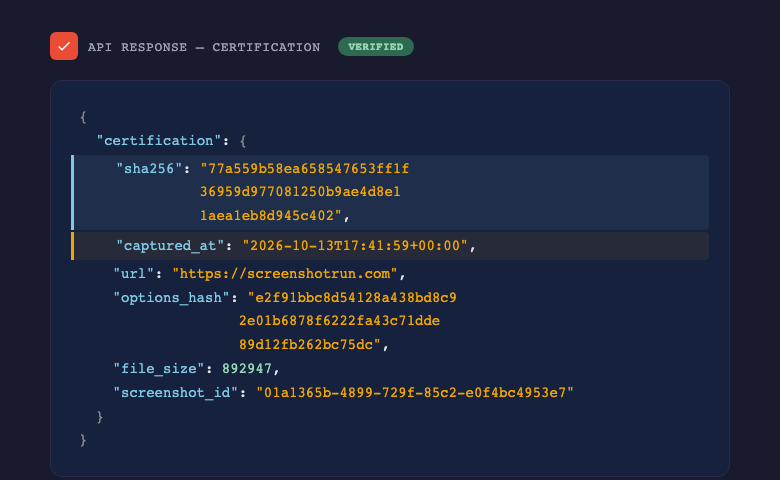
That request captures your homepage as a French visitor would see it. The certified=true parameter adds a cryptographic fingerprint of the captured image, a precise capture timestamp, and a hash of the capture parameters to the response. If anyone later questions the screenshot, you verify the hash against the file. One byte changed means the hash won't match.
Geolocation sets the browser's coordinates to Paris. Combined with timezone=Europe/Paris, the page renders with French locale signals. Cookie consent platforms use these signals to show the right banner variant. Without geolocation, you're capturing whatever default version the CMP serves to a datacenter IP.
And the JSON response gives you everything for the audit trail:
{
  "data": {
    "id": "f7a21e3b-...",
    "status": "completed",
    "url": "https://yoursite.com",
    "width": 1280,
    "file_size": 487320
  },
  "certification": {
    "sha256": "a4e9c1f38b7d2e6...",
    "captured_at": "2026-10-13T09:15:22+00:00",
    "options_hash": "7c3b8a1d5e9f...",
    "url": "https://yoursite.com"
  }
}
Store the certification object alongside the image file. That pair is your evidence: the image plus its fingerprint. Three months later, run sha256sum on the image file and compare it to the stored hash. If they match, the image hasn't been touched.
We ran a real certified capture of screenshotrun.com from Paris (geolocation 48.8566, 2.3522) to show what this actually produces:
Multi-region captures for cookie banner compliance
Cookie consent rules vary by country. CNIL requires explicit opt-in with no pre-ticked boxes. The UK ICO accepts "legitimate interest" for analytics cookies. California's CCPA requires a "Do Not Sell" link but doesn't need a consent banner for all cookies. Your site might show different banners in each jurisdiction, and each one needs to be correct.
A Python script that captures your site from five regulatory jurisdictions every morning:
import requests
import json
from datetime import datetime

API_KEY = "YOUR_API_KEY"
BASE_URL = "https://api.screenshotrun.com/v1/screenshots/capture"
TARGET = "https://yoursite.com"

regions = [
    {"name": "france", "lat": 48.8566, "lng": 2.3522, "tz": "Europe/Paris"},
    {"name": "germany", "lat": 52.5200, "lng": 13.4050, "tz": "Europe/Berlin"},
    {"name": "uk", "lat": 51.5074, "lng": -0.1278, "tz": "Europe/London"},
    {"name": "california", "lat": 34.0522, "lng": -118.2437, "tz": "America/Los_Angeles"},
    {"name": "brazil", "lat": -23.5505, "lng": -46.6333, "tz": "America/Sao_Paulo"},
]

for region in regions:
    params = {
        "url": TARGET,
        "full_page": "true",
        "certified": "true",
        "geolocation": json.dumps({
            "latitude": region["lat"],
            "longitude": region["lng"],
            "accuracy": 100
        }),
        "timezone": region["tz"],
        "block_ads": "true",
        "format": "png",
        "response_type": "json",
        "width": "1280"
    }

    resp = requests.get(BASE_URL, params=params,
                        headers={"Authorization": f"Bearer {API_KEY}"})
    result = resp.json()

    # Save certification data
    record = {
        "region": region["name"],
        "date": datetime.now().isoformat(),
        "certification": result.get("certification"),
        "screenshot_url": result["data"].get("screenshot_url")
    }

    with open(f"compliance/{region['name']}_{datetime.now().strftime('%Y-%m-%d')}.json", "w") as f:
        json.dump(record, f, indent=2)

    print(f"Captured {region['name']}: {result['data']['status']}")
Run that as a daily cron job and you build a compliance archive automatically. Each record ties a screenshot to a specific geolocation, timestamp, and SHA-256 hash. When an auditor asks "what did French visitors see on September 15th?", you pull the file and verify the hash. Done.
For larger operations covering dozens of URLs across multiple regions, the webhook_url parameter lets the API process captures asynchronously. Fire all requests at once, and the API POSTs results to your endpoint as each one completes. No polling, no timeouts on your side.
Beyond cookie banners: other compliance captures
Cookie consent is the most common use case, but compliance teams capture a lot more than banners.
Pricing pages are a good example. A developer pushes a pricing update that skips legal review. Nobody catches it until a customer complains. With automated screenshots, you have yesterday's version and today's version side by side, an exact visual diff. Add full_page=true to get everything including the footnotes and fine print below the fold.
Privacy policies and terms of service change too, and when they do, the old version usually just disappears. An automated capture with certified=true before each update gives you a timeline: what was live and when. That matters the day a user claims they never agreed to a particular clause. You need to pull up the version that was online when they signed up.
If your company runs promotional landing pages or affiliate disclosures, FTC expects those disclosures to be visible. A capture with block_ads=false shows the page with ads, a separate one with ads blocked shows it clean. Both go into the record.
Checkout pages are another one. PCI-DSS 4.0 cares about unauthorized changes to payment forms. If someone injects a skimmer script and the form suddenly has a new field or a different layout, scheduled screenshots catch the visual change before it sits there for weeks unnoticed.
What a compliance screenshot audit trail looks like
Auditors want organized records. You don't need anything fancy here. The JSON from the API response plus a consistent folder structure gets you most of the way.
Something like this:
compliance/
  2026-10/
    yoursite.com/
      france/
        2026-10-13_cookie-banner.png
        2026-10-13_cookie-banner.json     # certification data
        2026-10-13_privacy-policy.png
        2026-10-13_privacy-policy.json
      germany/
        2026-10-13_cookie-banner.png
        2026-10-13_cookie-banner.json
      california/
        ...
    competitor.com/
      ...
Each JSON file holds the certification object from the API: the SHA-256 hash, capture timestamp, URL, and the options hash that locks down what parameters were used. For storage, go with something append-only. S3 with Object Lock works, so does Azure Blob with immutability policies. The point is that once a file lands there, nobody can change it. Not even your own team.
One thing to watch: some consent management platforms serve different banner variants randomly for A/B testing. I ran into this with a client whose OneTrust setup was testing three different banner layouts. Two captures ten minutes apart showed completely different consent text, which looked like a compliance failure until we traced it to a CMP experiment. Note this in your compliance documentation so the auditor doesn't flag it as a discrepancy.
What won't work for every compliance scenario
Automated screenshots handle visual evidence well. They don't replace everything a compliance program needs.
Worth keeping in mind: screenshots can't verify that a cookie banner actually blocks tracking cookies. They show what the banner looked like, not whether clicking "Reject All" actually stopped Google Analytics from firing. For functional testing, you need tools like Cookiebot scanner or a browser extension that inspects network requests. Screenshots prove presentation. Functional compliance testing proves behavior.
Interactive flows are tricky. If compliance depends on what happens after a user clicks three buttons and fills in a form, a single static screenshot misses the interaction. The API supports click_selector and js injection to simulate some interactions, but complex multi-step flows need a different approach (actual browser automation or manual testing).
Court admissibility is a gray area. A certified screenshot with a SHA-256 hash is strong evidence, but it's not notarized. Some courts accept API-generated screenshots as business records. Others want more. For day-to-day compliance and audits, the API approach is solid. For litigation where millions are on the line, pair it with a notarized capture service to cover your bases.
Time zones create subtle issues. If your API call fires at 00:05 UTC and the page content changed at 23:58 in the user's local timezone, the "daily" capture might show stale content. Set your capture schedule to align with the working hours of the jurisdiction you're monitoring, not your server's timezone.
FAQ#
Daily works for most cases. Cookie banners change when your CMP pushes an update, and daily captures catch most of those. For pricing pages and terms of service, trigger a capture on every deployment and keep a daily backup capture as a safety net. Start there and increase only if changes are slipping through.
No. Screenshots show what was displayed, which is one piece of the puzzle. They won't tell you whether the "Reject" button actually blocks cookies, whether your contrast ratios pass WCAG, or whether your policy language holds up legally. Screenshots are the evidence layer. The rest of the audit still needs to happen.
No. Focus on jurisdictions where you actually have regulatory exposure. For most companies that's a handful of EU countries with active enforcement (France, Germany, Italy, Spain), the UK, California, and maybe Brazil. Capturing from every country you have traffic from is overkill unless you've received a specific inquiry from a regulator in that jurisdiction.
Depends on the regulation. GDPR enforcement has a statute of limitations of roughly 3-5 years depending on the country. SEC rules ask for 3-6 years depending on record type. If you're not sure, keep everything for at least 5 years. Storage is cheap. Missing evidence when you need it is not.
It proves the file hasn't been modified since capture. That's the main thing. It doesn't prove who captured it or exactly when, unless you trust the API provider's timestamp. For internal audits and regulatory compliance, that's usually enough. For serious litigation, you might want to layer in a notarized capture service or a blockchain timestamp on top.