
Website Thumbnail API for Link Previews
 Vitalii Holben
You have a list of links and you need a picture for each one. A bookmark manager with 200 saved pages. A SaaS directory where every entry needs a visual preview. A dashboard that monitors competitor landing pages. The task sounds simple: fetch a thumbnail of each URL. In practice, it breaks in a dozen ways before you get a single clean image.
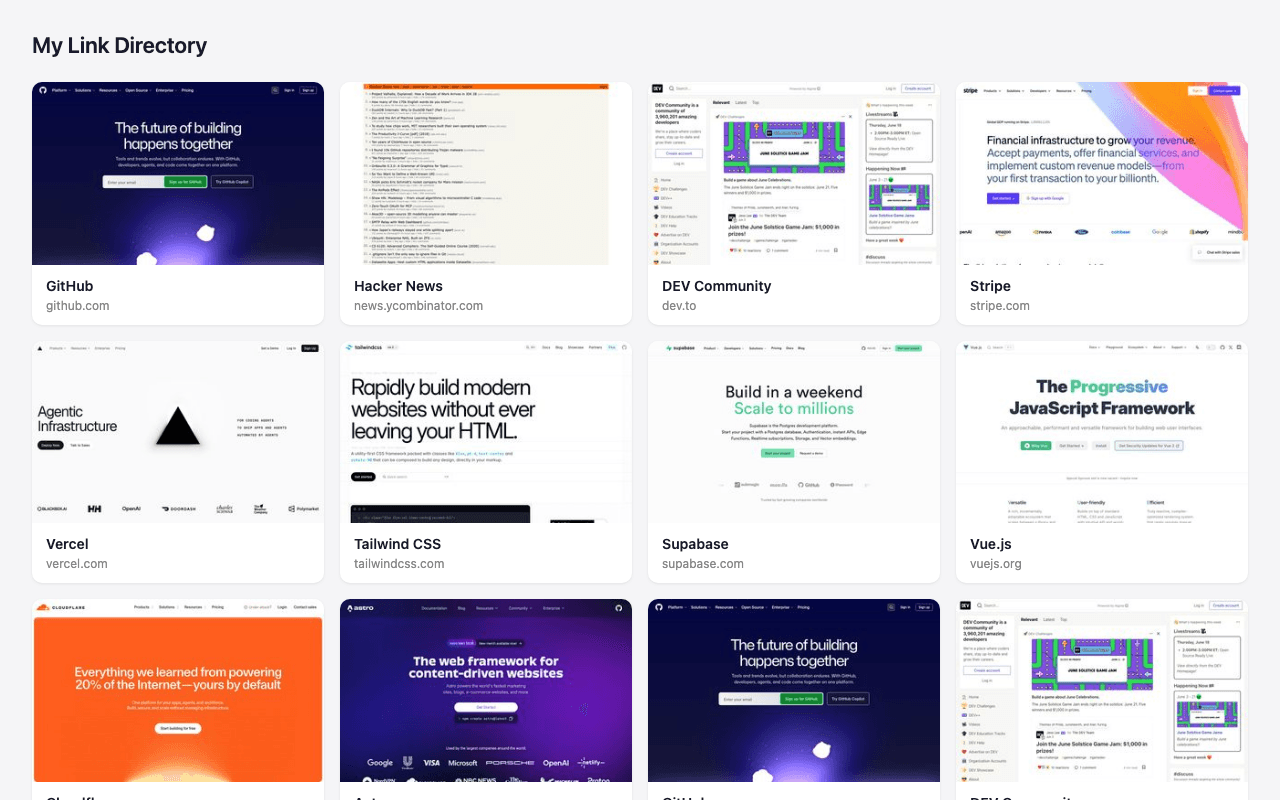
Open Graph tags were supposed to solve this. Every site sets an og:image, and you just scrape it. Except half the sites you'll encounter don't set one at all. And the ones that do often serve a generic company logo that looks identical across 50 different pages. I pulled og:image tags from 300 URLs in a link directory I maintain, and 112 of them either returned a 404 or pointed to the same brand asset. That's not a link preview. That's a wall of broken thumbnails and repeated logos.
A screenshot of the rendered page beats metadata every time
The fix is straightforward: open the page in a real browser, wait for it to render, and take a screenshot. You get what the visitor would see, not what the site owner remembered to put in a meta tag three years ago. The question is how you run that browser.
Running Puppeteer or Playwright on your own server works fine for 10 URLs. At 500, you start hitting memory limits, zombie processes, and the occasional Chromium crash that locks up your queue. I wrote about the full build vs. buy tradeoff in a separate post, but the short version: if link previews aren't your core product, managing browser infrastructure is a distraction you don't need.
A screenshot API handles the browser, the rendering, the cleanup. You send a URL, you get an image.
Capturing a thumbnail with one API call
You send the URL and your preferred dimensions, and the API captures it in Chromium:
curl "https://api.screenshotrun.com/v1/screenshots/capture?url=https%3A%2F%2Fnews.ycombinator.com&width=1280&height=800&format=jpeg&quality=80&resize_width=480" \
  -H "Authorization: Bearer sr_live_your_key_here"
That resize_width: 480 is doing the heavy lifting for thumbnails. The API renders the page at full 1280x800 resolution (so text and layout look sharp), then scales the output image down to 480px wide. You get a thumbnail that's readable at small sizes without capturing at a tiny viewport where the site would show its mobile layout instead.
Cookie consent banners are blocked by default. That matters more than you'd expect. Without it, about 40% of European sites fill half the screenshot with a GDPR dialog.
The og:image fallback chain
Not every URL needs a fresh screenshot. Some sites do have solid og:image tags. A good link preview system tries the cheapest option first and falls back to the API only when needed.
async function getPreview(url) {
  // Step 1: Try og:image from metadata
  const ogImage = await fetchOgImage(url);
  if (ogImage && await imageExists(ogImage)) {
    return { src: ogImage, source: 'og:image' };
  }

  // Step 2: Fall back to screenshot API
  const response = await fetch(`https://api.screenshotrun.com/v1/screenshots/capture?url=${encodeURIComponent(url)}&width=1280&height=800&format=jpeg&quality=80&resize_width=480&delay=2`, {
    headers: {
      'Authorization': `Bearer ${process.env.SCREENSHOTRUN_API_KEY}`,
    },
  });

  const { data } = await response.json();
  return { screenshotId: data.id, source: 'screenshot' };
}
Step 1 costs nothing. A quick HEAD request or HTML parse to grab the og:image URL, then a check that the image actually loads. If it does, use it. If not, the API captures a real screenshot. For the 300-URL directory I mentioned, this cut API usage by about 40%, because some sites genuinely do maintain their social cards.
One gotcha that a naive implementation misses: og:image URLs expire. Shopify stores, Medium posts, and CDN-backed sites rotate their image URLs. An og:image that works today might 404 in a week. You need to re-validate periodically, not just on first import. I covered the full lifecycle in how to cache screenshots.
When the page is blank: handling SPAs and lazy content
Modern web apps don't render on the server. A React dashboard, a Vue admin panel, a Next.js marketing page with client-side data fetching. The HTML that arrives from the server is a shell. The real content shows up after JavaScript runs, API calls finish, and the framework mounts its components. Capture too early and you get a white rectangle.
The delay parameter adds a fixed wait after the page loads. Two to three seconds handles most marketing sites. But some apps load data from external APIs with unpredictable response times, and a fixed delay is either too short (blank screenshot) or too long (wasted seconds on every capture).
wait_for_selector solves this. It pauses the capture until a specific element exists in the DOM:
{
  "url": "https://app.example.com/dashboard",
  "wait_for_selector": ".dashboard-grid",
  "format": "jpeg",
  "quality": 80,
  "resize_width": 480
}
The API waits up to 10 seconds for .dashboard-grid to appear. If the element shows up in 800ms, the capture happens immediately. No wasted time. If it never appears, the API captures whatever is on screen and you get a fallback image instead of hanging forever. More on SPA-specific patterns in how to screenshot single-page applications.
There's no magic selector that works for every site. If you're building a directory of user-submitted URLs, you can't predict what DOM structure each page uses. For those cases, delay: 3 is the pragmatic choice. Save wait_for_selector for pages you control or pages you've tested.
Batch processing a link directory
A single API call works for one link. A directory of 500 links needs a pipeline. Here's a Node.js script that processes a list of URLs, polls for results, and downloads the images:
const fs = require('fs');
const API_KEY = process.env.SCREENSHOTRUN_API_KEY;
const API_BASE = 'https://api.screenshotrun.com/v1';

async function captureAndDownload(url, filename) {
  // Create the screenshot
  const params = new URLSearchParams({
      url,
      width: '1280',
      height: '800',
      format: 'jpeg',
      quality: '80',
      resize_width: '480',
      cache_ttl: '86400',
    });
  const createRes = await fetch(`${API_BASE}/screenshots/capture?${params}`, {
    headers: { 'Authorization': `Bearer ${API_KEY}` },
  });

  const { data } = await createRes.json();

  // Poll until ready
  let screenshot;
  while (true) {
    const poll = await fetch(`${API_BASE}/screenshots/${data.id}`, {
      headers: { 'Authorization': `Bearer ${API_KEY}` },
    });
    screenshot = (await poll.json()).data;
    if (screenshot.status === 'completed') break;
    if (screenshot.status === 'failed') {
      console.error(`Failed: ${url} — ${screenshot.error.message}`);
      return null;
    }
    await new Promise(r => setTimeout(r, 2000));
  }

  // Download the image
  const imgRes = await fetch(screenshot.links.image, {
    headers: { 'Authorization': `Bearer ${API_KEY}` },
  });
  const buffer = Buffer.from(await imgRes.arrayBuffer());
  fs.writeFileSync(`previews/${filename}`, buffer);
  return filename;
}

// Process links sequentially to respect rate limits
const links = [
  { url: 'https://github.com', name: 'github.jpg' },
  { url: 'https://news.ycombinator.com', name: 'hn.jpg' },
  { url: 'https://dev.to', name: 'devto.jpg' },
];

(async () => {
  fs.mkdirSync('previews', { recursive: true });
  for (const link of links) {
    await captureAndDownload(link.url, link.name);
    console.log(`Done: ${link.name}`);
  }
})();
Notice cache_ttl: 86400 in the request. If the same URL was captured within the last 24 hours (with the same options), the API returns the cached result instantly. No re-rendering, no extra credit spent. For a directory that refreshes daily, this means only genuinely new or changed links consume API credits.
For directories with hundreds of links, process them in a queue rather than a tight loop. I wrote about rate limiting strategies for production that apply directly here. The free tier handles 200 screenshots per month. A 100-link directory refreshed every two weeks fits. For larger directories, the paid plans scale to thousands of captures.
A Laravel job for link preview generation
If your directory runs on Laravel, a queued job fits better than a script. Here's a job that captures a preview, downloads the image, and stores the path on the link model:
use Illuminate\Support\Facades\Http;
use Illuminate\Support\Facades\Storage;
use App\Models\Link;

class CapturePreview implements ShouldQueue
{
    public function __construct(private Link $link) {}

    public function handle(): void
    {
        $response = Http::withToken(config('services.screenshotrun.key'))
            ->get('https://api.screenshotrun.com/v1/screenshots/capture', [
                'url' => $this->link->url,
                'width' => 1280,
                'height' => 800,
                'format' => 'jpeg',
                'quality' => 80,
                'resize_width' => 480,
                'cache_ttl' => 86400,
            ]);

        $screenshotId = $response->json('data.id');

        // Poll until ready (max 30 seconds)
        $image = retry(15, function () use ($screenshotId) {
            $status = Http::withToken(config('services.screenshotrun.key'))
                ->get("https://api.screenshotrun.com/v1/screenshots/{$screenshotId}")
                ->json('data');

            if ($status['status'] !== 'completed') {
                throw new \Exception('Not ready');
            }
            return $status;
        }, 2000);

        // Download and store
        $imgResponse = Http::withToken(config('services.screenshotrun.key'))
            ->get($image['links']['image']);

        $path = "previews/{$this->link->slug}.jpg";
        Storage::disk('public')->put($path, $imgResponse->body());

        $this->link->update(['preview_path' => $path]);
    }
}
Dispatch it when a new link is added: CapturePreview::dispatch($link). The full tutorial on adding thumbnails to a link directory walks through the database schema, Blade rendering, and refresh scheduling.
Picking the right viewport size for preview cards
Viewport choice affects what your previews show. Capture at 375px wide and you get the mobile version: stacked layout, hamburger menu, no sidebar. That rarely makes a good thumbnail for a desktop directory UI.
1280x800 is the safe default. It captures the standard desktop layout that most people picture when they think of "what this website looks like." Resize the output afterward with resize_width for whatever card size your UI needs.
If you're building for a specific platform, these viewport sizes match common preview card dimensions:
| Platform / Context | Preview card size | Recommended capture viewport | resize_width |
|---|---|---|---|
| Desktop directory grid | 320x200 | 1280x800 | 320 |
| Dashboard wide cards | 480x300 | 1280x800 | 480 |
| Slack-style link unfurl | 250x150 | 1280x800 | 250 |
| Mobile feed (1:1 crop) | 300x300 | 1280x800 | 300 |
For details on device-specific viewports and emulation, the custom viewport and device emulation feature page covers the full range from 320px mobile to 3840px widescreen.
When link previews go wrong: errors, redirects, slow sites
Not every URL cooperates. Some redirect three times before landing. Some return a 403 because they block datacenter IPs. Some take 12 seconds to load because they ship 4 MB of JavaScript before rendering a single paragraph.
The API follows redirects and waits up to the timeout value (default: 30 seconds) for the page to finish loading. If the page returns an error, the API captures whatever the browser shows. Sometimes that's a styled 404 page. Sometimes it's a blank white screen with "Access Denied" in the title.
You don't want to display a screenshot of a 404 page as a link preview. Check the response before storing it. If the screenshot's status is failed, the error object tells you what went wrong (timeout, DNS failure, connection refused). Swap in a placeholder image for failed captures. Your users won't notice a generic "preview unavailable" card, but they will notice a screenshot of someone else's error page. The full approach is in screenshot API error handling for production.
Some sites detect headless browsers and serve different content or block the request entirely. For those, I don't have a universal fix. Most public-facing marketing pages render fine, but internal tools and some enterprise sites will resist automated capture no matter what you do. Wait strategies help with timing issues, but they can't override access restrictions.
Link previews vs. Open Graph image generation
These solve different problems and people confuse them constantly. Link previews capture what someone else's page looks like. Open Graph images are what your pages show when shared on Twitter or Slack. Both involve screenshots, but the workflow is different.
For link previews, you capture external URLs you don't control. For OG images, you either design an HTML template and render it as an image, or capture your own pages at 1200x630 (the standard OG size). Many projects need both. A link directory needs previews of the listed sites and OG images for the directory pages themselves. Same API, different inputs.
Start generating link previews
Get your API key — 200 free screenshots/monthLink preview thumbnails are one of those features that look trivial on a whiteboard and get complicated in production. Between stale og:image tags, JavaScript-heavy pages, cookie banners, and sites that block automated browsers, there's a lot of surface area for things to break. The API handles the browser infrastructure, but the caching strategy, the fallback chain, and the error handling are still yours to build. If you want the full implementation walkthrough, the link directory tutorial covers it end to end. And if you hit an edge case I haven't covered here, send it my way. For a comparison of free tiers across screenshot APIs (relevant if you're generating previews on a budget), see the free screenshot API comparison. Teams working with compliance or legal requirements can also use the same API for website archiving, and marketing teams use the same captures for email preview testing across clients and devices.